

Choose a face swap or a whole-head edit
An AI head swap can mean inserting a new face into a photo or replacing the complete head, including hair and silhouette. A face-swapping processor may retain the target hairstyle and head outline. If those details belong to the wrong character, a facial identity change alone will not satisfy your brief.
For an original creator campaign, decide which identity reference you want to keep and which scene details should survive. Write the operation before choosing the tool: replace facial identity, replace head and hair, or generate a new scene around an approved character. Each operation needs a different acceptance check.
| Operation | Change requested | Review |
|---|---|---|
| Face swap | Facial identity inside the target portrait | Landmarks, expression, color and face boundary |
| Whole-head replacement | Face, hair and outer head shape | Hair edges, ears, neck join and scale |
| New creator scene | A fresh image based on the accepted identity | Recognizability and scene brief |
| Video face swap | Identity across moving frames | Temporal stability, occlusion and difficult turns |
Keep source identity and target scene separate
The source face is the identity you want to insert. The target is the image whose pose, outfit and setting you want to preserve. Label those roles clearly instead of uploading two files with an instruction that merely says “swap.” Use original fictional adults or portraits you have permission to edit and publish.
A clear source with visible eyes and a similar camera angle makes comparison easier. Begin with a target that has a visible face and limited obstruction. Keep the uncropped originals so you can inspect changes to hands, clothing and the background after the edit.
See the inputs before judging the result
These two independently generated fictional adults make the input roles visible. The ceramic artist is the identity reference. The studio host is the target scene. Both original files are downloadable, so you can compare the entire scene rather than a cropped face.

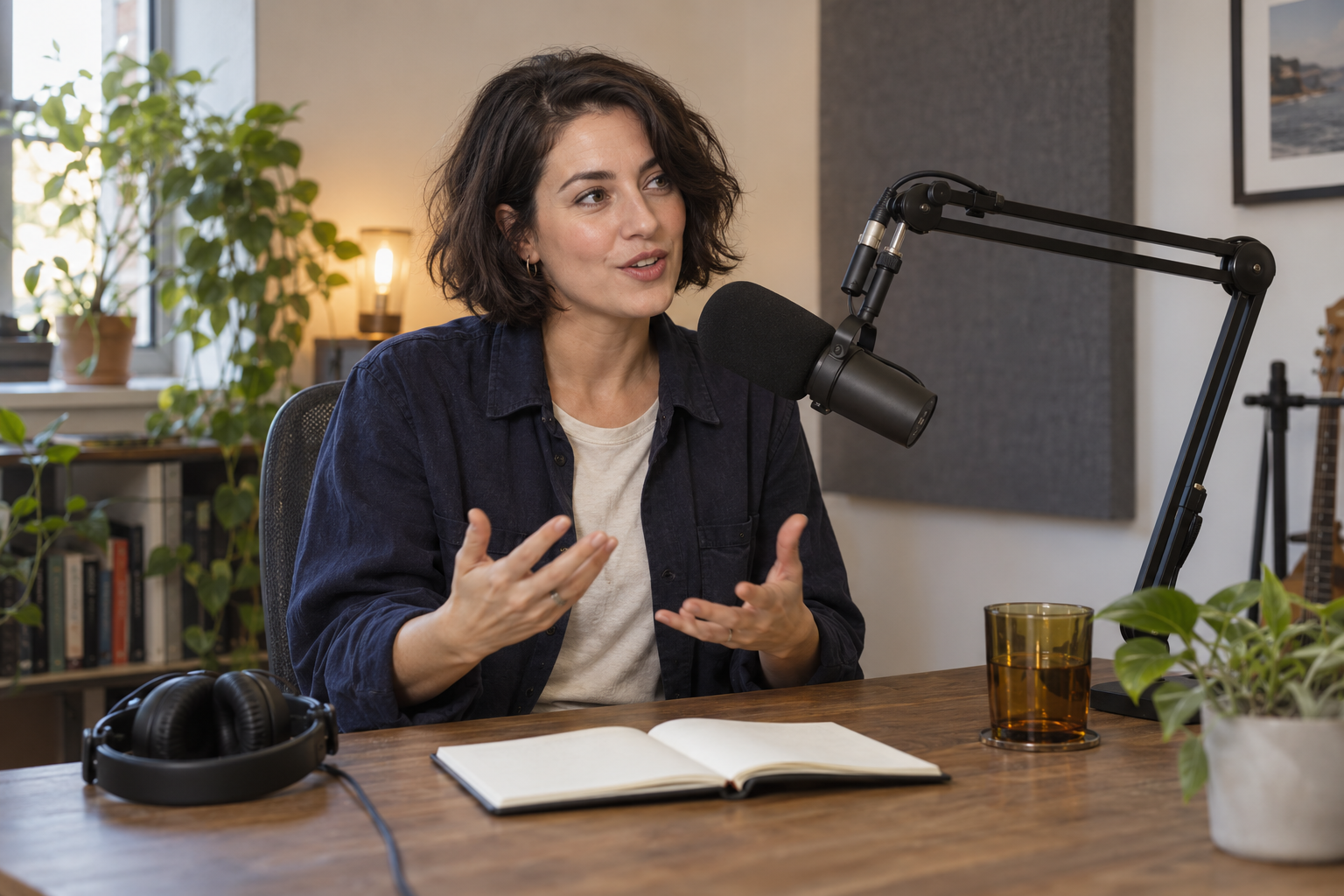
Download the source identity · Download the target studio scene
Use documented controls rather than assuming a full head swap
FaceFusion’s face-swapping documentation describes model selection and pixel boost controls. Its masking documentation describes occlusion, area and region masks with blur and padding. Those controls help define a facial edit; they do not establish that the processor replaces every hair strand and the entire head outline.
When a requested whole-head replacement includes a new hairstyle, use an editor that supports the necessary reference-led local reconstruction. Define the head boundary and protect the approved scene. Review the ears and neck connection at native size because an attractive face can still sit awkwardly on the body.
Write a brief a reviewer can accept or reject
Use image one as the original fictional adult identity reference. Use image two as the target studio composition. Replace the target’s facial identity with the source’s recognizable eye spacing, nose and facial proportions. Preserve the target pose, spoken expression, navy overshirt, hands, microphone, desk and lighting. Keep the target hairstyle for this face-only trial. Do not add lettering or change the room.
This is a face-only trial brief. A full head-swap brief would specify the source hair and outer head shape too. Save the exact inputs beside the output and record which interpretation you tested. The wording states your constraints; it is not proof that the editor followed every one.
Inspect the complete photo rather than only the new face
Compare the exported result with both inputs at equal size. Check the source landmarks first, then the target expression and lighting. Inspect hair edges, ears, teeth and the neck join. Finally compare the target clothing, hands, microphone and background. Reject unrelated changes when those details must remain exact.
Use a smaller transformation or a more compatible source angle when identity drifts. If the face is recognizable but the boundary is visible, revise the local mask or blend rather than regenerating the complete scene. A preview is only an intermediate check: inspect the actual downloaded resolution and campaign crop before publishing.
Compare the face-only and whole-head trials
We made two reference-led edits from those same inputs using a built-in image generation editor. The first brief asked for facial identity while retaining the target bob. The second asked for the source face and short curls together. These are actual generated photo edits, not screenshots of FaceFusion or Clout and not a comparison of competing tools.
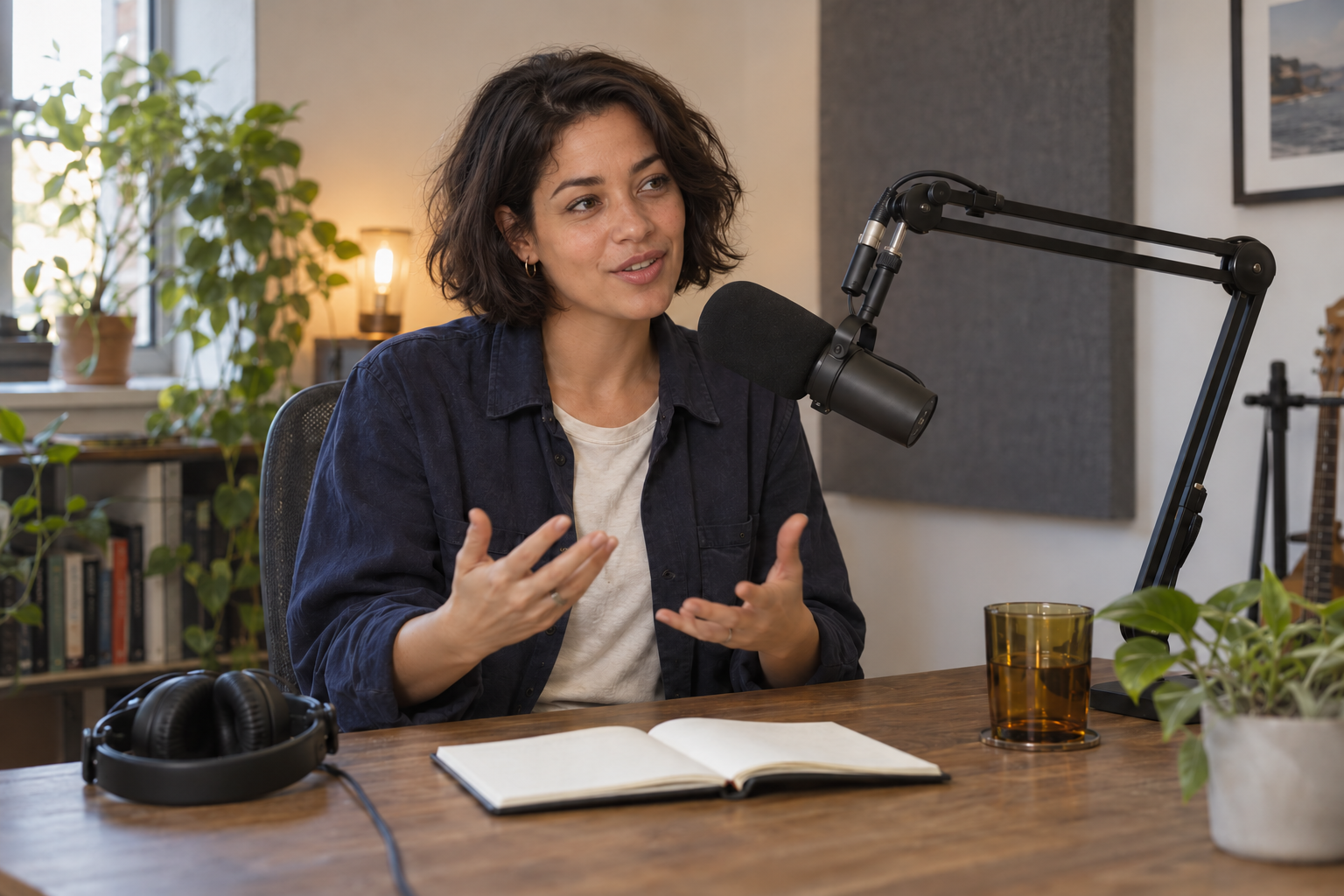
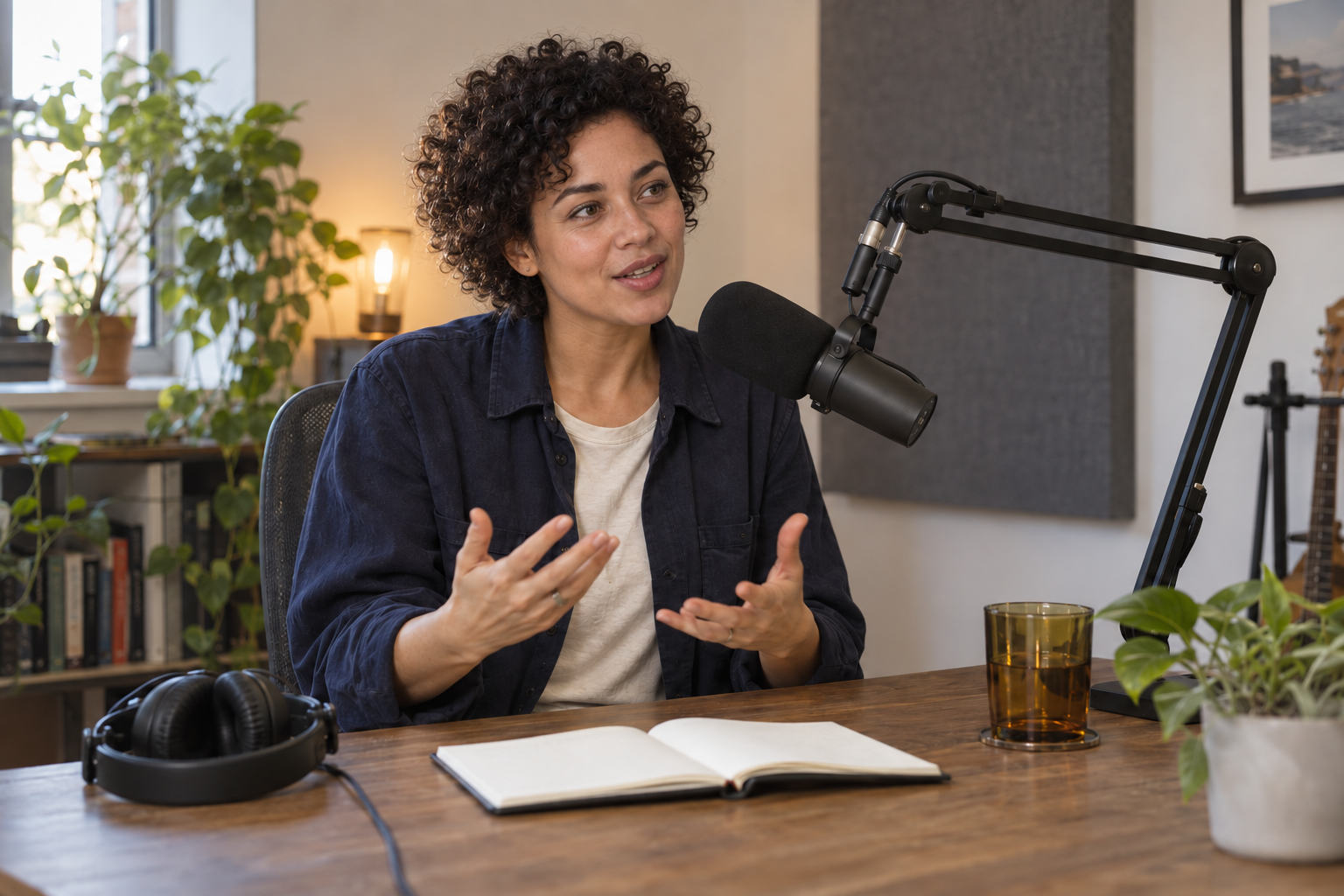
Download the face-only trial · Download the whole-head trial · Download the head swap review sheet
The face-only result changes the face and skin appearance while keeping a broadly similar bob. Its mouth shape and nearby hair details shift too. In the whole-head result, the short curls and rounded hair silhouette visibly follow the source direction. The viewing angle and speaking mouth are interpreted for the studio scene. Neither result establishes exact facial identity preservation.
| Review area | Face-only observation | Whole-head observation |
|---|---|---|
| Hair silhouette | Target bob remains broadly similar | Short curls replace the bob |
| Expression | Mouth and nearby details shift | Speaking mouth is adapted to the target angle |
| Scene | Studio objects and gestures remain visually similar | Studio objects and gestures remain visually similar |
| Identity | Reference interpretation rather than a measured match | Reference interpretation rather than a measured match |
The clothing, gestures, microphone and broad room layout remain visually similar in both exports. That observation is weaker than pixel-perfect preservation. If your campaign needs those regions unchanged, compare the downloaded files with the target and use a local editing workflow that protects them. Do not approve a regenerated scene merely because the face looks attractive.
Give a full head swap its own boundary brief
Use the ceramic artist as the fictional adult identity reference. Replace the studio host's complete head with the source face and short tight curls, including the outer hair silhouette. Adapt the viewing angle, speaking expression and neck connection to the target. Preserve the navy overshirt, cream shirt, two hands, microphone, desk and room. Do not transfer the apron or bowl.
The extra hair instruction is the operational difference from the face-only brief. Include ears and the visible neck transition in your review instead of assuming the new face solves the whole portrait. A target with a dramatically different angle, strong backlighting or an obstructed head may require a different source view or a separate local repair.
Repair the mismatch you can actually see
| Problem | Inspect | Next revision |
|---|---|---|
| Correct face with the wrong hairstyle | Whether the request included hair and outer shape | Use a whole-head boundary instead of another facial blend |
| Head appears too large | Head scale against shoulders and neck | Reduce the replacement scale while retaining the scene |
| Visible neck seam | Skin tone, shadow direction and local edge | Repair that transition with matching target light |
| Hands or microphone change | Protected regions outside the requested edit | Reject the export or use stronger local protection |
Make one revision at a time and keep the previous file. Changing identity, head scale and lighting together makes it harder to tell which instruction fixed the mismatch. Review the final campaign crop only after the complete photo passes, since cropping can hide an incorrect neck connection without fixing it.
Check free and online head swap exports before committing
An online head swap preview and a usable campaign export are different checkpoints. Check the actual download, its dimensions, visible watermark, account requirement and permitted use. A free credit allowance does not establish unlimited free head swaps or an export without sign-up. This guide does not claim a tested free browser service.
Save the two inputs, exact instruction and accepted output together. Record any charge or allowance used alongside rejected attempts. For a head swapper you intend to use repeatedly, compare the same permitted photo brief and downloaded files rather than judging polished examples from different sources.
Use the review sheet across a creator campaign
The downloadable CSV has six review areas and blank fields for your intended change, export observation, decision and revision notes. Start with identity, then hair silhouette, expression, the neck join and protected scene details. Finish with the downloaded size and campaign crop. A blank sheet is a practical recording template, not evidence that an untested service passed.
For a series, use an accepted original character reference as the starting point for every scene. Swapping from one edited output into the next can accumulate unwanted changes. Keep the initial portrait available and compare new exports against it, especially when hairstyle, age direction or camera angle changes.
Create new scenes around your original character
Create an original AI character in Clout and generate photos and videos around that identity and your scene brief. This is a useful route when the goal is a fresh campaign set rather than preserving every pixel of an existing studio photo. Review the accepted reference, hairstyle and visual direction across the set.
Create my original character in Clout


