

VidJoy is an AI photo and video app whose Android listing describes photo animation, templates and music-video creation. A useful first experiment is one clear subject doing one small action. Choose a source that is easy to recognize, decide what may move and review the entire exported clip before sharing it.
This independent guide uses an original fictional beagle reference and a five-second motion brief. The image is generated editorial source material, not a photograph of a customer’s pet. The brief has not been submitted to VidJoy and there is no completed VidJoy video in this article. The actual local crop study below helps you prepare the still before trying motion.
Find the right VidJoy app
The official Google Play listing identifies VidJoy AI Photo and Video Maker by Nexax Labs with package identifier com.nexax.vidjoy.ai.photo. Use that listing to check the current app, developer and device availability. Similar names do not establish that another download is the same service.
The developer describes photo-to-video, portrait and pet motion, AI images, templates, music and exports for social platforms. Those are product claims rather than features we tested. We did not install the app, connect an account, submit a photo or download a provider output.
Start with a readable photo
A source with a clear face, separated limbs and an uncluttered background is easier to inspect than a crowded scene. That does not guarantee a successful animation, but it makes changes easier to identify. Keep the original file rather than saving only a screenshot or a heavily cropped preview.
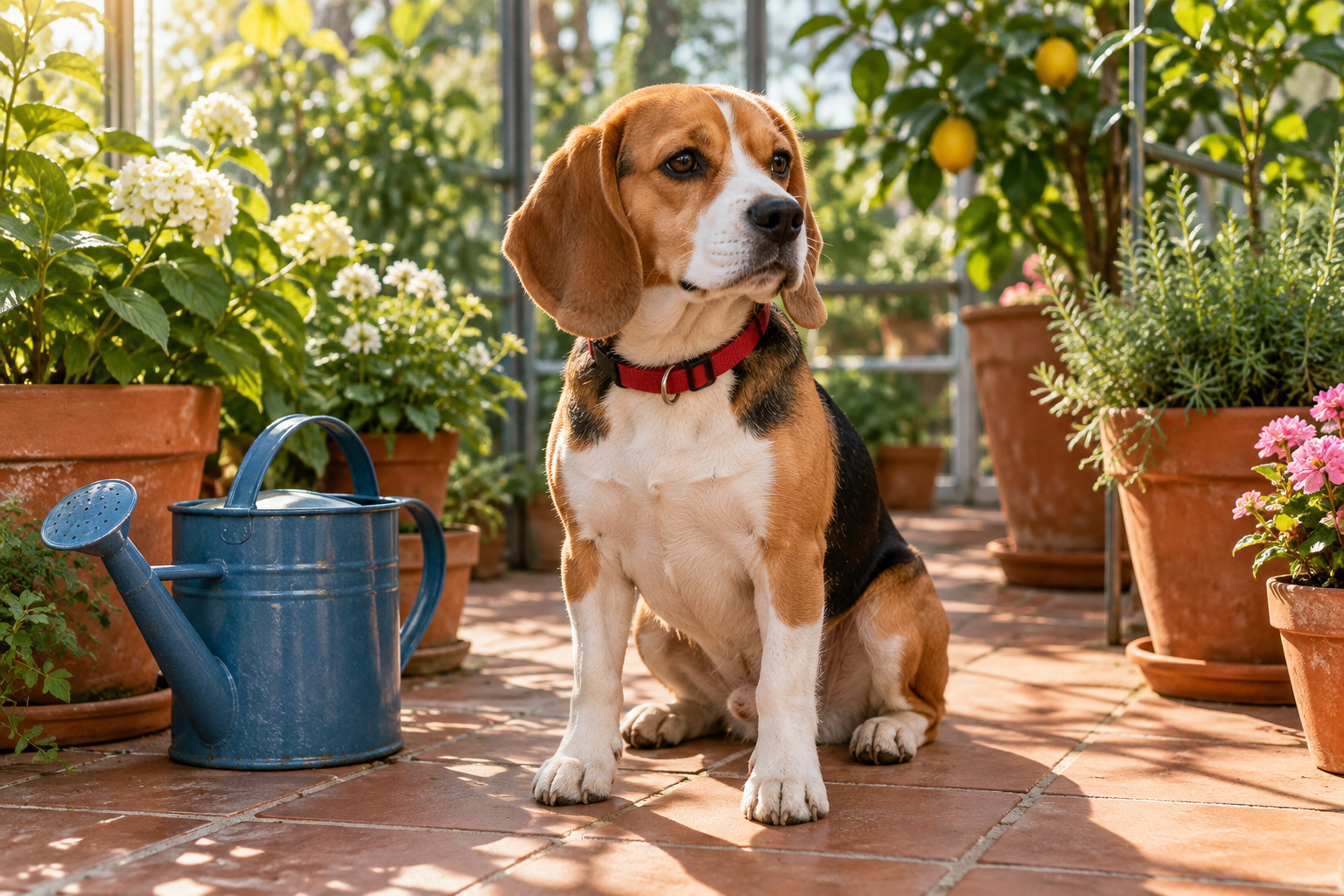
Download the native beagle reference to inspect the face, ears, paws, red collar and watering can. These visible details become a short identity checklist. A later clip should be judged against the actual input, not against a memory of how a beagle usually looks.
For your own pet, use an image you are entitled to upload. Remove unrelated personal material from the frame if it is not part of the project, and read the current upload and retention terms in the provider flow before submitting it.
Write a small motion brief
Keep this same seated beagle in the greenhouse. Use a locked eye-level camera and one small head turn toward the camera. Keep the red collar, ear colors, white muzzle, front paws and blue watering can recognizable. Keep the dog seated and preserve the surrounding objects.
The editable motion brief proposes a five-second creative target. It is not a VidJoy API schema and does not prove that the app accepts a custom duration, free-text prompt or every requested control. If your selected workflow offers templates instead, choose the closest restrained action and review its actual output.
Keep subject motion and camera motion separate. A small head turn with a locked camera isolates one change. Asking for walking, a fast orbit and a new setting at once makes it harder to identify why the result fails. Expand only after a completed candidate preserves the details that matter.
Inspect the portrait crop before animating
A landscape reference and a vertical delivery frame are different compositions. A centered crop can remove ears, paws or a nearby product even if the full image looks suitable. Decide which details must remain before asking the model to invent motion around the input.
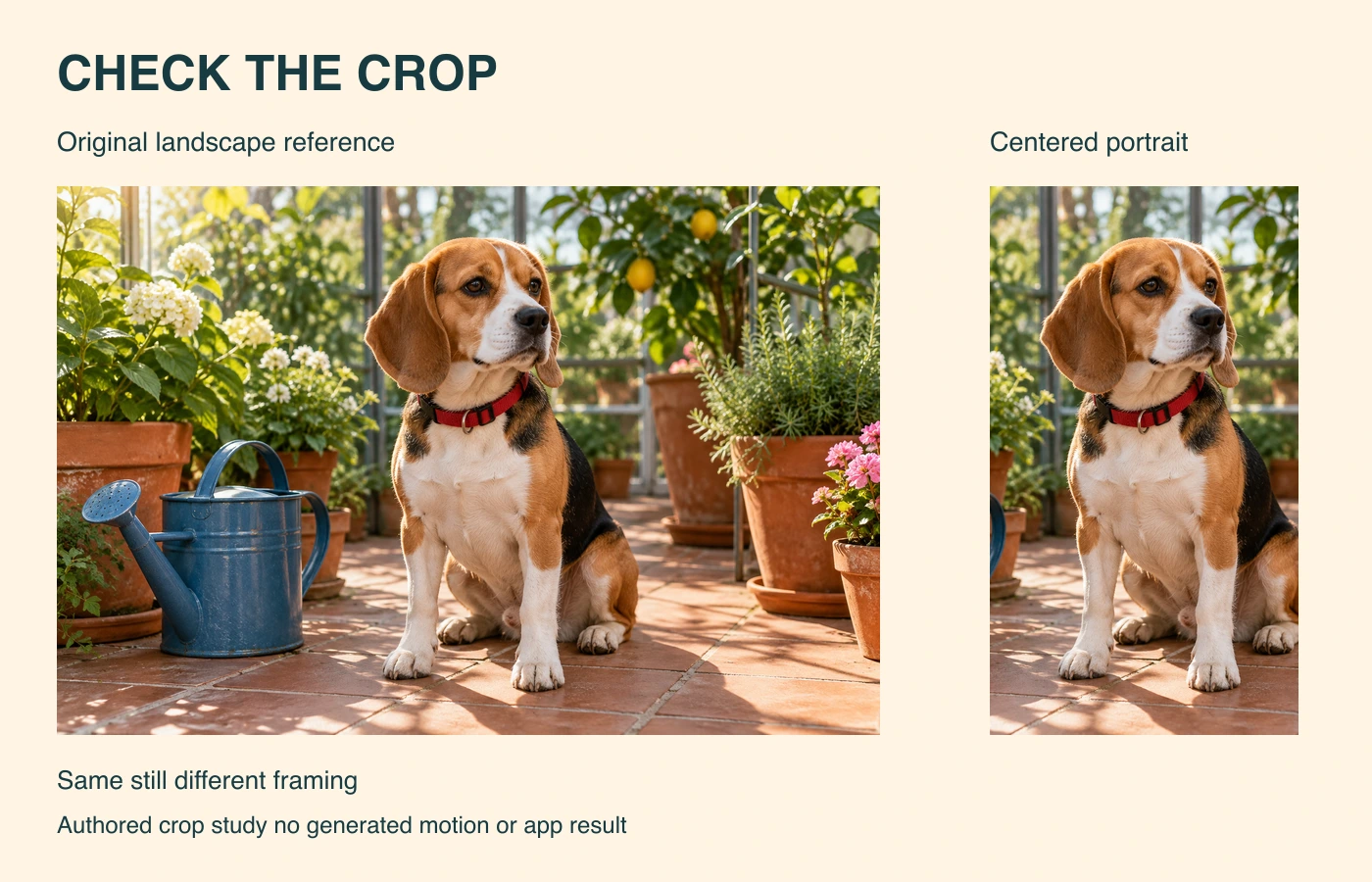
The downloadable crop report records the native dimensions and exact centered portrait rectangle. The layout source rebuilds the comparison using Bun and Sharp 0.34.5. It performs ordinary image cropping and layout, not AI inference or an app upload.
Judge whether the cropped input still tells the intended story. If the watering can is part of the action but sits outside the portrait frame, revise the composition before generating. If only the dog’s expression matters, a tighter crop may be a reasonable creative choice. Keep that decision explicit.
The measured source is 1536 by 1024 pixels. Its centered full-height portrait crop starts at x 480 and y 0 with a width of 576 and height of 1024 pixels. On visual review the face ears red collar and front paws remain visible while most of the watering can disappears. That is a framing observation rather than a motion-quality result.
Choose a template by the intended action
A template name or preview is a starting point. It does not establish that your subject will keep the same markings, proportions or position. Compare the shown movement with the intended motion brief and record the actual settings available to your account.
For the beagle, a subtle portrait-style movement is a more focused first question than a multi-scene transformation. For a travel image, the priority might instead be whether the horizon and buildings remain stable. For a product still, inspect shape, lettering and contact with the surface. Use the source-specific details rather than one universal quality score.
Review the complete motion result
The blank motion-review ledger separates first, middle and last-frame identity from full-clip review. It has no prefilled success claims. Add your actual candidate identifier, duration, defects and acceptance decision after you obtain a file.
- Compare the first frame with the supplied reference.
- Inspect the face and ears through the head turn.
- Check that the paws remain attached and the collar does not become a different object.
- Watch background edges and the watering can throughout the clip.
- Review the final delivery crop after any reframing.
- Listen to the downloaded export if music or speech is present.
Still frames can reveal a changed marking or duplicated object, but they do not prove smooth movement. Watch the entire file at normal speed as a separate check. We have not performed that check for a VidJoy output here because no video was generated.
Check music downloads and current account conditions
Confirm the current charge, export size, watermark and download conditions in the app before starting a job. The listing does not establish a universal free allowance or unlimited generation. Avoid carrying an offer from a different app or an older screenshot into your budget.
If you add music, check the track’s applicable usage rights and inspect the final mix. A successful photo animation does not by itself establish permission to use a particular soundtrack in a commercial post. Keep the downloaded file and its actual settings with the review row.
Before animating an edited still compare our ChatGPT photo-editing guide and actual collar-color revision with the native original.
Choose the next workflow from the actual job
For a named-model video example with a real native clip, use our Runway Gen guide and paper-boat pilot. For timing an existing narration track, inspect the Auto-Editor source and cut. These are separate exercises and do not demonstrate VidJoy performance.
Explore Clout Image and Video for available image and video operations. Choose the actual operation, supported references and account quote before submitting work. Clout and VidJoy are separate products; this guide does not claim shared models, credits or app controls.
Keep the untouched source, accepted crop, brief, returned candidate and review decision together. The resource provenance record identifies the original still and local study files by hash. A clear small experiment gives you a better basis for the next creative decision than assuming that a template label predicts the finished result.


