Runway Gen 4.5 is a video generation model with text-to-video and image-to-video routes. Choose the input route first: words can establish a new scene, while an approved image can anchor an existing composition. Then direct the action, camera and progression you want to see in the clip.
This independent guide follows Runway's Gen 4.5 creation guide and official prompting guidance. The scene examples are original untested briefs, not a quality or speed benchmark. Check the current model and operation settings before submitting a paid attempt.
Choose text to video or image to video
| Starting point | Useful route | Review priority |
|---|---|---|
| A scene idea without approved artwork | Text to video | Composition, appearance and action all need approval |
| An accepted character or product composition | Image to video | Motion preserves the important source details |
| An existing clip requiring a change | A documented editing operation | Confirm that the selected workflow accepts video input |
A model name does not establish every possible input route. Use an editing workflow for an existing-video edit rather than assuming text-to-video can modify a supplied clip. For that separate task, see the Runway Aleph guide.
Prepare an original station scene
Imagine an adult courier in an orange raincoat at a quiet station, carrying a small lantern beside a doorway. The shot needs one readable action: the courier takes two measured steps toward the door. A wide reference should show the feet, destination and lantern clearly. A tightly cropped portrait would not provide the same starting composition.
For image-to-video, inspect the approved source before generating motion. Look at hands, coat closures, lantern attachment and floor contact. Keep the accepted reference and its identity record beside the brief. A repeated prompt is helpful direction but does not prove that a model preserves the same character in another shot.
Write the scene as visible action
Wide cinematic shot of an original adult courier in an orange raincoat on a wet station platform at dawn. The courier takes two measured steps toward an open doorway while carrying one small lantern. Soft rain, warm doorway light and a restrained camera movement. The action resolves with the courier beside the door.
This original text-to-video brief defines appearance and motion together. For image-to-video, let the accepted image establish the composition and describe the required movement more directly. Avoid adding a large collection of unrelated camera terms.
The courier takes two measured steps toward the doorway. The raincoat hem moves gently and the lantern remains in the same hand. A slow sideways camera move keeps the full figure visible. The shot ends before the courier passes through the door.
Runway's text-to-video prompting guide is tailored to its current generation workflow. Treat provider examples as guidance for that route. A prompt copied into another model may have different controls and behavior.
Control progression without overloading the shot
Describe the start, change and ending when those moments matter. A shot that begins in an empty doorway and ends with a courier inside requires more progression than a small head turn. Keep the first attempt narrow enough that you can identify the failing beat.
Try one action before adding a camera orbit, a second performer or changing weather. If the lantern becomes a different object during the walk, simplify the movement or choose a clearer reference. If the camera crosses the figure and hides the hands, revise framing separately from the character design.
Record the actual settings and cost
Before generating, record model, input route, duration, aspect ratio, output settings and quoted charge. The older Gen 4 and Turbo guide has specifications for those named operations; do not apply its credit arithmetic to Gen 4.5. Use the current generation panel and Runway pricing guide for the account budgeting question.
Download the blank Gen 4.5 shot review sheet to keep the quote, accepted passage and revision notes together. The sheet contains no prefilled performance results. Include rejected attempts and finishing time when comparing the cost of usable footage.
Inspect the full clip
Watch once at normal speed, then inspect the start, middle and ending. Check the courier's feet, the lantern, coat silhouette, doorway geometry and camera direction. Identify the first frame range where a problem appears. A clean opening image cannot demonstrate stable movement.
Separate completed generation from accepted footage. A clip may contain a useful short passage even if the rest fails the brief. Save the original before trimming and record the accepted interval. Review sound separately if the chosen workflow supplies it; do not infer a soundtrack from a visual-generation claim.
Choose an export for your finishing workflow
Runway's output-format guide documents format choices for Gen 4.5 in Tool Mode and distinguishes supported surfaces. Check that your actual interface exposes the intended option. A preview download and an editing master can have different requirements.
Open the downloaded file in the destination editor. Check dimensions, duration, frame order and playback through the entire clip. For image sequences, preserve numbering and deliberate frame-rate interpretation. For video, inspect the encoded file rather than assuming that a filename extension establishes every stream property.
Build a short sequence from accepted shots
After the station walk works, add a lantern insert and a reaction close-up. Keep the same approved character and location references. Edit the usable passages into one coherent moment before generating a longer story. Add exact titles and captions as editable finishing layers.
Explore Clout AI Cinema for a separate scene-production workflow or Clout Image and Video for available creation operations. Inspect the selected model and quote in that studio; this article does not establish that a Clout operation is a Runway Gen 4.5 endpoint. The practical goal is a reviewed final sequence with clear inputs and reproducible decisions.
Inspect one actual text to video pilot
Watch this clip and view its details
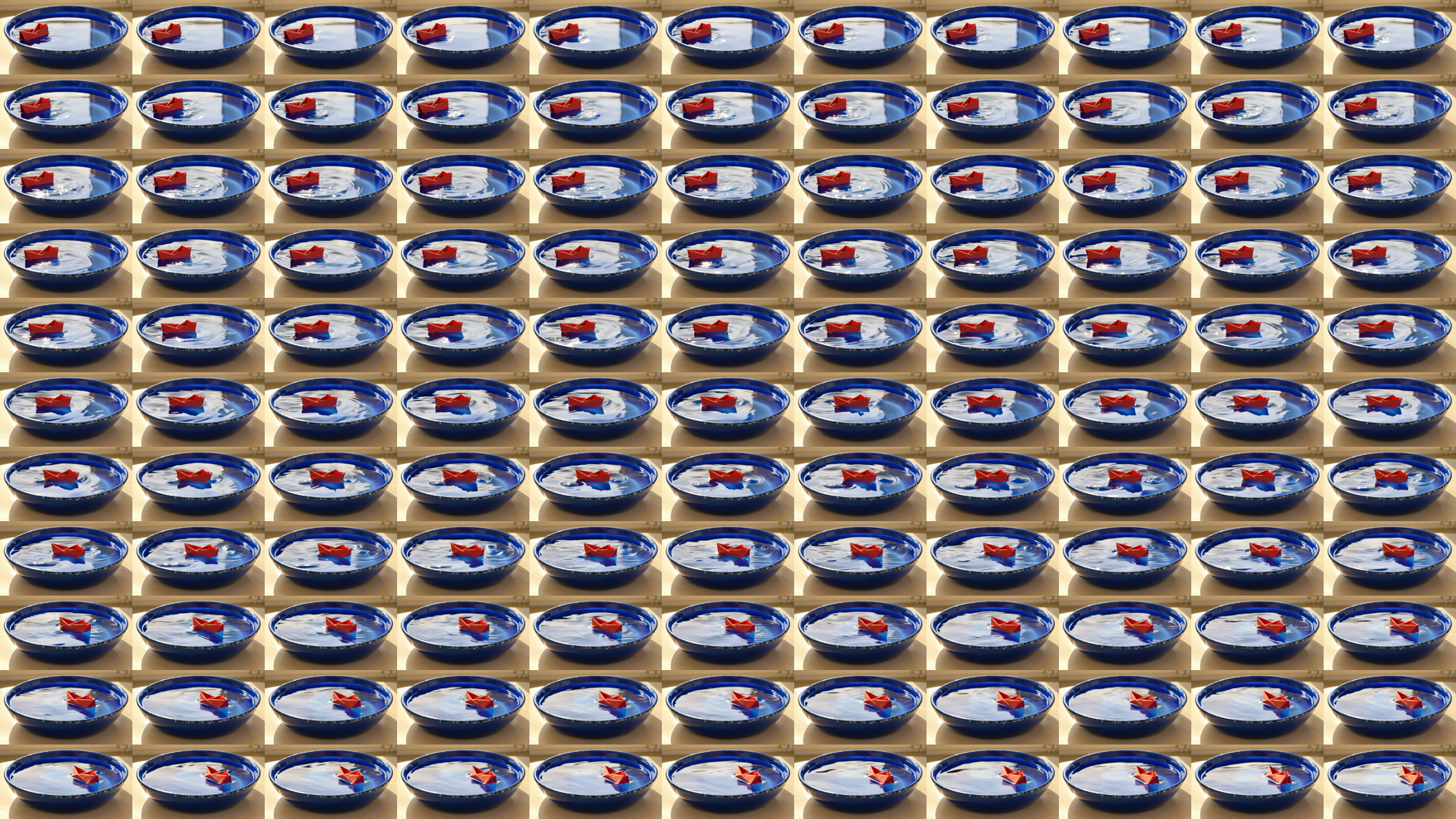
We generated one original paper-boat motion study. The request described a red folded boat floating slowly left to right across a cobalt basin, with warm window light and a locked camera. No image reference was attached. This is an actual generated clip, separate from the unsubmitted scene prompts elsewhere in the guide.
The native download is H264 at 1280 by 720, with 121 frames at twenty-four frames per second and a measured duration of 5.041667 seconds. It has no audio stream. Download the unchanged original MP4 or open its dedicated watch page.
The generation and file record contains the exact submitted text, native properties, review scope and resource hashes. It identifies the connected route rather than implying that we tested the native Runway application or directly called its API. The requested five-second description and the actual encoded duration are recorded separately.
Review motion separately from file completion
The 121-frame contact sheet includes every decoded frame in left-to-right, top-to-bottom order. Inspection of that sheet and full-resolution frames zero, sixty and one hundred twenty found the boat progressing from the left toward the right while remaining visible. Its orientation changes during the take.
That is a frame-based review of one scene. Thumbnail coverage does not establish fine detail at full resolution in every frame, and no real-time browser playback or controlled model comparison was performed. Use the full native clip to inspect folds, water contact, ripples and the ending in your own delivery context before production approval.
The filled review CSV and inspection commands preserve the evidence. Complete decoding establishes that the file can be processed; it does not establish artistic quality or ad performance. This silent pilot also does not test speech, lip sync or a sound-design workflow.