

What is a spec ad
A spec ad, short for speculative advertisement, is a piece of advertising created without a client commission. A filmmaker, designer or creative team makes it to demonstrate an idea and the ability to execute it. The work can belong in a portfolio or pitch, but it should not imply that a brand commissioned, approved or ran the campaign.
Runway’s AI spec ad guide describes the format as an uncommissioned mock commercial. Epidemic Sound’s filmmaking guide also discusses its role as a work sample. The useful question is what your example demonstrates: a clear concept, controlled product imagery, a deliberate edit or a strong visual voice.
This page is about that portfolio workflow. For an actual announcement with a real offer, use the product launch video guide. For a shot-by-shot production plan, use the shot list maker. A spec commercial can use those production skills while serving a different purpose from a commissioned launch or a paid advertising test.
Watch an original AI spec ad example
Watch this clip and view its details
One Small Pause is our original fictional tabletop concept. A cobalt ceramic cup sits on an orange plinth against a mint background. The view tightens as pale steam curls upward, followed by an authored end card. The finished silent edit lasts 9.041667 seconds. It is an uncommissioned portfolio study, not a real product advertisement or a customer result.
The edit uses one generated take and one graphic card. There is no second camera angle, filmed demonstration or recorded performance hidden in the assembly. Download the finished spec edit and two-beat edit plan to see the complete structure. The creative choice is to let one quiet object carry the idea rather than adding a montage that the brief does not need.
Write the brief before generating the commercial
A useful brief makes the creative decision specific enough to review. Name the audience and the one idea you want the viewer to remember. Identify the product or fictional concept, the visual details that matter and the next decision the work should support. Separate an emotional message from any factual claim about an actual product.
Our message is a small morning pause. The audience is creative collaborators assessing a visual direction. The fictional product has a cobalt glaze, an ivory interior and one handle. We requested a restrained push-in and steam, with no people, logos, music or generated lettering. There is no heat-retention claim, manufacturing specification or suggestion that the cup is available to buy.
Download the executed creative brief and blank spec ad brief template. Before expanding an idea, ask whether each proposed shot adds something the viewer needs. A second angle can reveal a detail; an unrelated dramatic environment may simply make the portfolio piece harder to explain.
Inspect the native generation separately from the edit
Watch this clip and view its details
This is the actual native Clout output. The operation used Seedance Pro with a six-second request, audio disabled and no image references. The returned file is 864 by 496 pixels at 24 frames per second, lasting 6.041667 seconds. The landscape request was 16:9; retain the measured file dimensions when reproducing this particular study rather than assuming an exact delivery ratio from the request.
The observed operation charged 8 Clout credits. The separate editorial cover charged 5 credits, for 13 credits across the two creations. These are dated observations, not permanent rates or a free-generation offer. Check the current operation and quote when making your own scene in Clout Image and Video.
Because this is text-to-video, there is no real product photograph against which to establish identity accuracy. A real campaign would need approved product references and a review against the actual item. Here the question is narrower: does the returned fictional cup and movement support the intended visual idea?
Review motion and product continuity across the clip
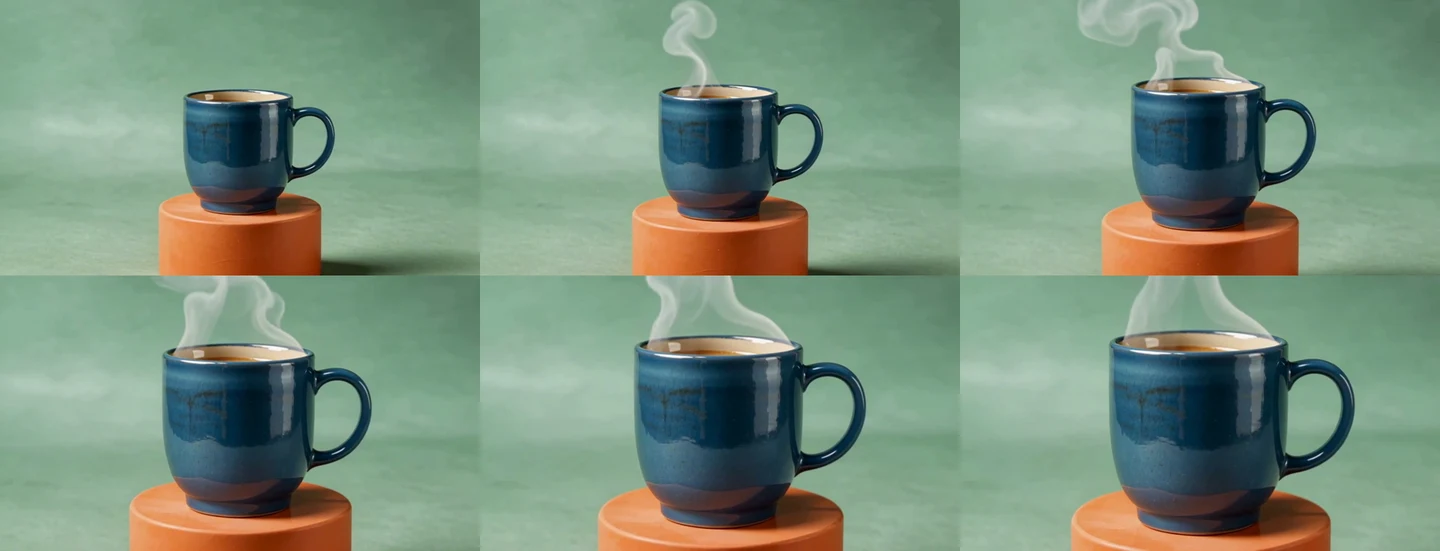
The playback check and sampled frames show one upright cobalt cup with a recognizable right-side handle. The camera view tightens, and the steam becomes a prominent curling plume. We did not observe a gross duplicate cup in the six sampled frames or an interrupted playback. Those are qualitative observations of one output, not a calibrated geometric test or evidence that the steam follows measured fluid behaviour.
| Review area | Observation in this study | Editorial decision |
|---|---|---|
| Product silhouette | One upright cup and right-side handle remain recognizable | Accept for a fictional mood piece |
| Camera | The view tightens across the shot | Supports the restrained reveal |
| Steam | The plume grows and curls prominently | Treat as stylised atmosphere rather than physical evidence |
| Audio | No audio stream is present | Matches the silent study brief |
| Commercial claims | No real product or client result exists | Keep the fictional spec label visible |
The filled review sheet records these limits. Watch the complete clip at normal speed before relying on frame comparisons. Contact sheets can reveal gross changes, but they do not show every intermediate frame, the rhythm of a movement or the way an abrupt artifact catches attention in playback.
Keep text editable and make the ending deliberate
We left text out of the generation request and created the end card separately. Its headline is One Small Pause, followed by a fictional spec disclosure. The source SVG, rendered PNG and rebuild script are included. The final assembly retains all 145 native frames, then adds 72 card frames for a three-second hold.
That separation makes it possible to revise the message without generating the cup again. It also makes authorship clear: the moving shot came from Clout, while the card and assembly were authored locally. The cover showing a fictional creative director is another independent image and should not be presented as behind-the-scenes footage of a real production.
For a different placement, review the actual crop, text scale and reading time. Our landscape edit is not a tested vertical upload. If speech or music is added later, check the complete exported audio and the source permissions for its intended use. This example intentionally stays silent rather than attaching a soundtrack that has not been selected and reviewed.
Present spec work without inventing a client result
Present the idea, your contribution and the boundary of the example together. Explain what you directed, generated, selected, edited and reviewed. A useful portfolio note tells a collaborator how you think. Calling a fictional concept a client campaign, or adding fabricated conversion numbers, makes the work harder to trust.
Our example uses an original fictional object and no existing brand logo. If your project involves an actual brand, do not imply its participation or approval. Use appropriate source materials and establish the intended sharing context before publishing. This guide does not determine permissions for a specific company, asset or campaign.
The unsent portfolio introduction draft gives a simple structure: name the uncommissioned study, describe one idea, state your contribution and identify a reasonable next conversation. It is a downloadable draft, not an outreach message that has been sent. No commission, distribution or response is guaranteed by the format.
Need a stronger campaign concept before production? Our visual metaphor examples and brief show how to connect a product idea to one clear visual relationship.
Build a repeatable AI spec commercial workflow
- Define one audience and creative idea.
- Choose a fictional concept or appropriate approved product references.
- Write the shot and identify the details that must stay stable.
- Check supported controls and the current generation quote.
- Generate and preserve the actual native output.
- Review the complete clip and record accepted and unresolved details.
- Assemble accepted footage with editable copy and any reviewed audio.
- Publish with accurate authorship, commission status and context.
Use the local moodboard maker to organise direction before rendering, or the animatic workflow to test a longer sequence with stills first. When the idea needs multiple planned scenes, explore Clout AI Cinema. The purpose is to make the next creative decision clearer, not to add complexity merely because more generation is available.
Download the original spec ad source pack
- Complete source pack with native clip and rebuild files
- Native Clout clip
- Finished local edit
- Executed brief and measured settings
- Blank creative brief
- Generation and assembly provenance
The source pack can rebuild the edit locally with Python 3 and FFmpeg; it does not call an API or spend generation credits. Change the end-card SVG and render a matching PNG in your preferred SVG tool to change its design. Keep your real project’s product references, approval notes and final file alongside the brief so the next version has a reliable starting point.


