For detailed reference assignments, original downloadable assets and three creator prompts, read the Seedance R2V workflow guide.
Seedance searches mix several jobs: learning what the model does, finding access, writing a prompt, comparing versions and looking for a free allowance. Those are different decisions. Start by identifying the version and interface, then build a brief around the controls actually available there.
For a recurring creator, the useful test is whether the chosen workflow can turn an approved reference into a scene you can publish. A model demonstration or viral clip is not evidence that your own brief will work on the first attempt.
What Seedance does and which version you mean
ByteDance's February 2026 launch announcement describes Seedance 2.0 as a multimodal audio-video model using text, image, audio and video inputs. The official Seedance 2.5 announcement is dated July 31, 2026 and discusses expanded reference-led generation and editing.
Keep the version in your test notes. A guide for 2.0 does not automatically describe every control in 2.5, and a provider can expose its own operation limits. This article explains the production decisions without claiming an independent quality or speed benchmark.
Find access through an official starting point
The official Seedance model page links to trial and API routes. Use those links to identify the provider, then check account eligibility, supported operations, input limits and billing. A platform offering the model is a separate service with its own interface and terms.
Do not infer local installation from the existence of an API or third-party node. Running a model locally requires an official weights release, compatible inference code, licensing and appropriate hardware. Check those directly before following a ‘run Seedance locally’ download offer.
For a detailed distinction between local interfaces, remote ComfyUI nodes and offline inference, read the Seedance local access guide, with a request brief and an access worksheet.
| Access question | What to verify |
|---|---|
| Which version is available? | The exact model listed in the provider's generation interface |
| Can I use references? | Permitted image, video and audio types for that operation |
| Is a free allowance available? | Current account offer and actual export entitlement |
| What does a generation cost? | The chosen mode, duration, resolution and provider billing |
| Can I use the result commercially? | Applicable terms and rights to every input asset |
Give each reference a clear job
Separate the identity reference from the scene and motion references. The creator image defines who appears. A location reference can define the setting. A permitted video reference can guide movement. Audio direction belongs to the interface's supported audio workflow.
Write those roles explicitly in the brief. Avoid giving the model several unrelated faces, outfits and camera styles without saying which one controls each decision. Follow the provider's reference-label syntax rather than assuming an example from another platform will transfer unchanged.
A first creator video brief to test
Use the approved original adult creator reference for the same person. One continuous medium shot outside a cafe after light rain. The creator wears a red raincoat, looks toward the camera and lifts a plain takeaway cup once. The camera makes a gentle forward move. Soft reflections on the pavement, natural face and hand movement. End with the cup and face clearly visible.
Begin with that small action before trying a chase, outfit transformation or multi-character conversation. If you need exact dialogue, use the selected interface's documented audio controls and listen to the export. Do not assume the written scene prompt will produce the intended spoken words.
Review identity and action in motion
- Opening frame: compare the face, hair, garment and prop with the references.
- Action midpoint: inspect hands, object contact and body movement.
- Ending frame: confirm the requested reveal actually happened.
- Full playback: check unintended cuts, visual drift and audio timing.
- Delivery view: inspect the downloaded file at the destination's display size.
If the face changes during a camera move, reduce the move and return to a clearer identity reference. If the action is incomplete, simplify the action count. If a product label changes, use a controlled finishing step or a real product detail shot rather than treating the synthetic lettering as accurate.
Can you use Seedance for free
Seedance 2.0 free access is a provider offer, not a permanent property of the model. Dreamina's official Seedance page, checked October 2, 2026, says you can try the model with free daily credits. It lists watermark removal among paid plan benefits. The public page does not establish a universal daily balance or a guaranteed number of free clips for your account.
For a free Seedance video generator, start by checking the exact model available after signing in. An image allowance, an account registration or an older Seedance version is not evidence that the video operation you want costs nothing. Record the balance, generation charge and download conditions together. If the selected task exceeds the balance, reduce supported output settings or wait for the stated allowance reset rather than assuming the request will become free.
| Access route | What the public source establishes | What to check in your account |
|---|---|---|
| Dreamina daily credits | The official Seedance page describes a free daily-credit trial | Available model, balance, reset, task cost and export restrictions |
| Higgsfield unlimited access | Its help article scopes access by path, plan and output settings | Active unlimited models, expiry, toggle and selected settings |
| Higgsfield July trial | A dated promotion described one day with automatic paid renewal | Whether a new current offer exists and its cancellation deadline |
| Higgsfield July referral | A dated campaign required qualifying paid referrals | Current eligibility and terms rather than an old shared code |
Free unlimited access has specific boundaries
A search for Seedance 2.0 free unlimited needs a different answer from a daily-credit trial. Higgsfield's unlimited-access guide says access depends on the plan, path, resolution and duration. It directs users to Profile → Manage Account → Subscription → Active unlimited models for their own status. Jobs outside the included settings can still spend credits.
That guide limits unlimited access to the main Higgsfield website. It says MCP, CLI, Canvas and its other named studio routes use credits even with unlimited active. It also distinguishes a shared unlimited queue from faster credit-based generation. If a request deducts credits, inspect the route, toggle and settings before submitting another one.
“Unlimited” describes billing for an included operation during an entitlement window. It does not establish an endless entitlement, instant queue service or the right to download every format. For a production deadline, assess the actual queue and exported file as well as the credit charge.
Check trial renewal before activating an offer
The dated July trial article gave an activation deadline of July 23, 2026 at 1:30 PM UTC. That deadline is past as of this review. It described a 24-hour trial for eligible new free-plan users followed by automatic monthly Plus renewal, with cancellation available through the account subscription controls. An accessible blog post does not prove that promotion remains claimable.
For a Seedance 2.0 free trial available to you today, read the current activation screen. Note whether it requests a payment method, when paid renewal begins, the renewal amount, where cancellation is managed and which models are included. A recurring subscription after a free window is a different decision from daily credits without that renewal condition.
Keep a copy of the terms shown when you activate. If no current offer is visible, leave the trial status unknown. Do not substitute a July screenshot or someone else's subscription badge for your own account entitlement.
Understand referral access without relying on an old code
The query seedance 2 referral code invite friend for credits points to a conditional campaign, not a generic coupon that anyone can reuse. Higgsfield's July referral guide asked users to invite before July 17, 2026. That stated deadline has elapsed.
In that documented campaign, eligible Plus or Pro-and-higher users generated a personal referral link. Within 24 hours, the referred person needed to follow it, buy a qualifying monthly plan and complete a generation that spent credits. One, two or three qualifying friends earned three, five or seven days respectively, capped at seven. The described reward was temporary unlimited access, not an unconditional credit deposit.
If your account presents a new referral offer, use its current terms. Verify the deadline, required purchase, qualifying generation and reward status before inviting anyone. A signup alone did not satisfy the documented July rules, and a generation included in unlimited access did not count as credit-paid. This article does not provide a working referral code or assert the July campaign is active.
Download a free access review sheet

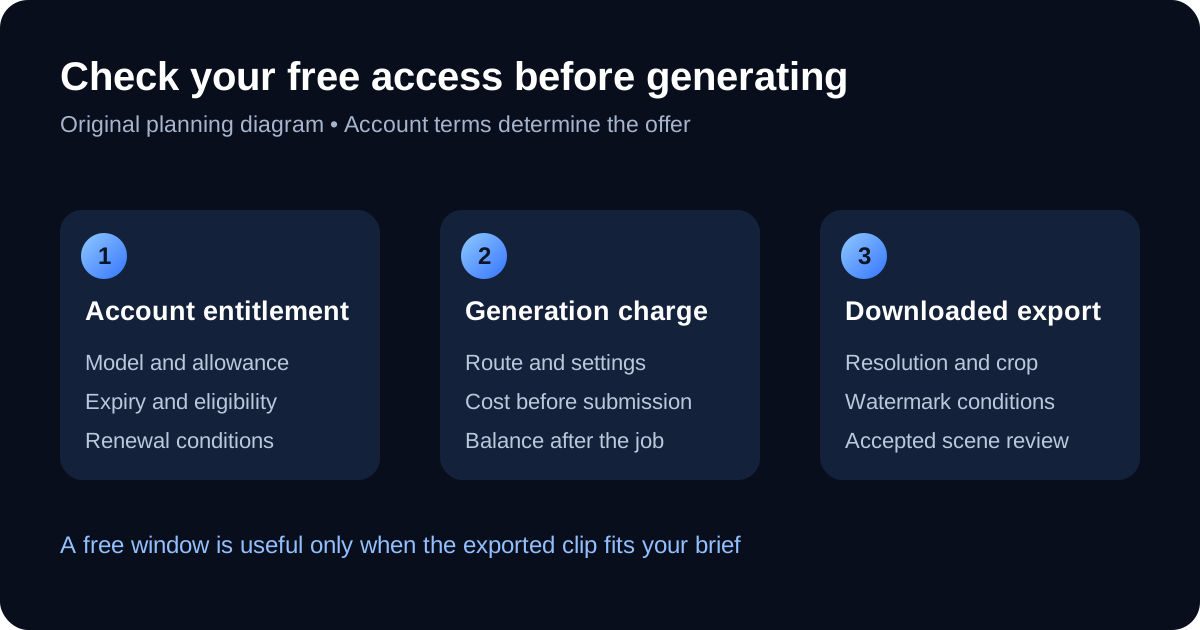
Download the access-planning diagram and the blank allowance review sheet. Compare a daily-credit offer, a trial and a referral reward without mixing their conditions. The sheet has no prefilled credits, prices or quality scores.
Before trying Seedance 2.0 for free, fill in the provider, model, allowance, expiry, selected task cost, renewal and export conditions. After a small test, add the actual charge and whether you accepted the downloaded clip. An unverified field should stay blank until you can read it from the account or export.
For example, a hypothetical balance of 24 credits and a task charge of six permits four attempts at those unchanged settings. This is arithmetic, not a stated Seedance offer. If only one clip passes review, the useful output is one accepted clip, not four campaign assets. Record retries and finishing separately when estimating the next production job.
A limited allowance works best when it answers a narrow production question. Use one reference, one action and one supported format. The Seedance R2V guide supplies original identity and prop references with prompts you can adapt. Approve the first frame and inspect the whole download before spending the next attempt on a more complex camera move.
Build a creator series around the accepted shot
Once one shot passes review, plan a short set: an introduction, a product moment and a simple closing scene. Reuse the identity and wardrobe brief, then change one action or location at a time. Keep the accepted references and source exports organized by campaign.
Clout gives you a workflow for building a recognizable AI creator and generating photos and videos around that identity. Create your campaign's AI creator and save an approved visual baseline before directing the next scene. The specific model name is one production choice within the wider content process.