

Seedance 2.5 API work starts with the operation and provider, not just the model name. Decide whether you are animating a first frame, supplying general references or editing existing footage. Then prepare that route’s inputs, submit one job and retain its identifier through result retrieval.
This guide uses an original paper pinwheel to prepare an image-to-video request for the documented fal US route. Download the first frame, local preflight report, planned input and job-review records. No video request has been submitted, so the files demonstrate input preparation rather than generation quality or current account access.
Choose the provider and operation first
The BytePlus ModelArk tutorial documents direct Seedance access with its own account, model activation and task API. A separate provider can expose different route names and input wrappers. Keep the chosen provider in your job record rather than assuming credentials or request bodies transfer between services.
| Your starting point | Operation to select | Input role |
|---|---|---|
| Text brief | Text-to-video | Describe a new scene |
| An approved first image | Image-to-video | Starting frame |
| A collection of creative assets | Reference-to-video | Appearance motion or sound guidance |
| Footage that must change | Editing | Selected source video |
The fal US reference schema exposes image, video and audio arrays plus a task choice. Editing changes its aspect-ratio and duration behavior; it is not equivalent to adding footage as a general reference. Read the selected route instead of mixing examples across operations.
For the consumer workflow and previously completed connected-tool clips, use the separate Higgsfield Seedance walkthrough. Those clips do not establish that a direct API request, another account or another region has been tested.
Inspect the original first frame

The pinwheel gives this small motion brief specific things to preserve: four mustard blades, one cobalt center pin, a teal stick and an ivory clay holder. The complete assembly is visible against a simple background. A change in blade count or a sliding holder would be easy to name during a later video review.
The actual PNG is 1672 by 941 pixels and 1,670,233 bytes. It is a landscape image close to 16:9, not an exact integer 16:9 canvas. Use the recorded dimensions when planning. Our selected image-to-video route uses automatic aspect ratio, so the plan does not force a separate 16:9 value.
The local preflight report records the file signature, dimensions, byte size and SHA-256. These checks identify the supplied file and catch a wrong or oversized local asset. They do not prove remote provider retrieval, content acceptance or successful generation.
Prepare a first-frame request
The fal US image-to-video schema requires image_url. It also documents an optional ending image, output resolution, duration and audio controls. Its aspect_ratio is always auto. The separate reference route has a broader aspect-ratio selector.
Our planned input JSON names bytedance/seedance-2.5/us/image-to-video and sets:
| Field | Planned value | Reason |
|---|---|---|
| image_url | Original pinwheel PNG | Starting frame |
| duration | "6" | Short first attempt |
| resolution | 720p | Chosen review export |
| aspect_ratio | auto | Selected route requirement |
| generate_audio | false | Motion-only review brief |
| codec | H264 | Chosen export setting |
The plan’s input object is the model input; the surrounding submitted: false and editorial notes are our record, not fields to send to the model. Preserve the documented duration value type rather than translating every number-like string into a number.
Write motion that can be reviewed
One continuous tabletop shot of this original four-blade yellow paper pinwheel. A gentle breeze turns the blades slowly around the cobalt center pin while the teal stick and ivory clay holder stay still on the coral table. Keep one pinwheel with four blades, the same colors and assembly. Static camera, soft daylight, no lettering and no new objects.
This is a planned motion instruction. It has not produced a video here. Keeping the camera still separates blade motion from a camera move. Keeping the holder still gives the reviewer another visible anchor. If a future result rotates the entire object, that is a concrete deviation from the brief.
A still can show the intended assembly but cannot prove that a generated sequence will keep its geometry. Watch the entire result, especially during rotation. A pleasing first frame does not settle whether blades merge, disappear or return with a different shape later.
Submit once and save the request ID
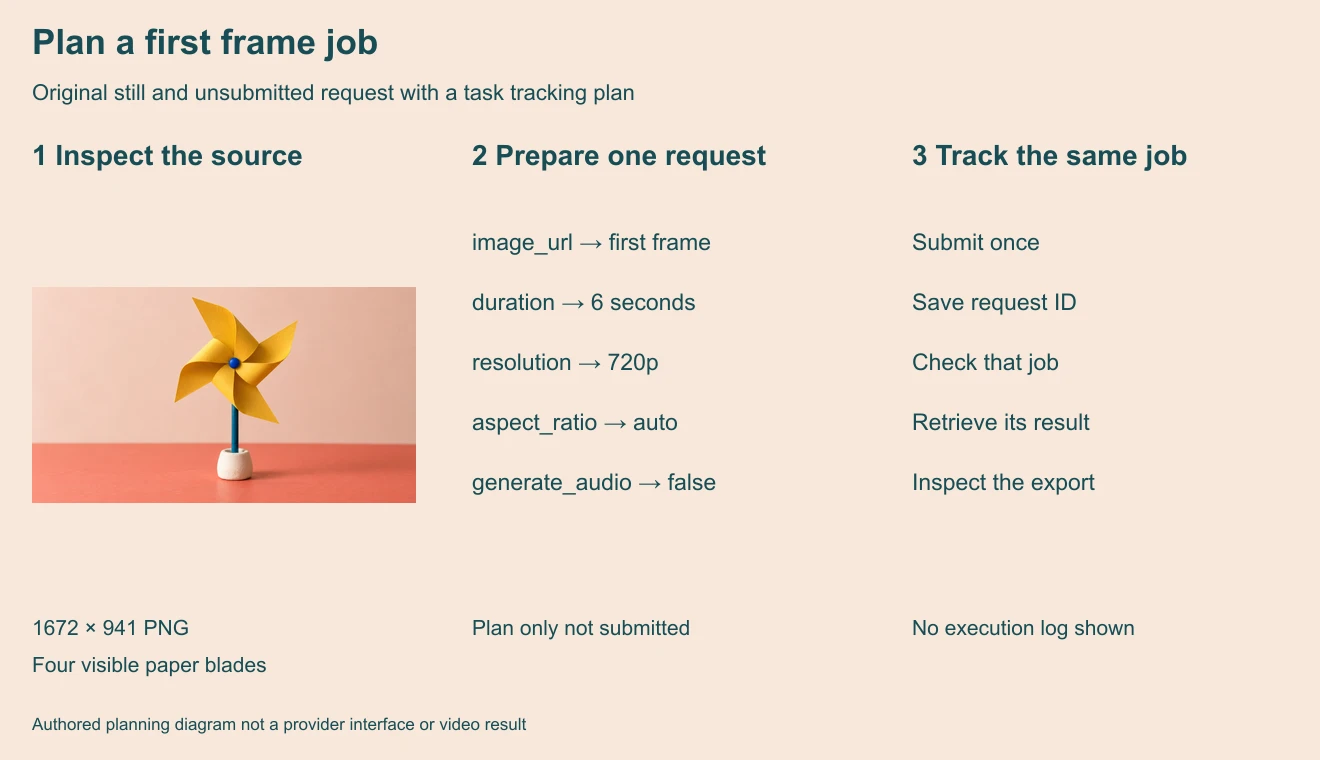
The fal queue documentation separates submission, status checks and result retrieval. In its JavaScript client, submit returns a request ID. Keep that ID with the endpoint and input record so later checks refer to the same job.
const accepted = await fal.queue.submit(endpoint, { input });
const jobId = accepted.request_id;
const progress = await fal.queue.status(endpoint, { requestId: jobId });
// Retrieve after the job reaches completion
const output = await fal.queue.result(endpoint, { requestId: jobId });
This abbreviated SDK sketch is documented usage, not an executed integration or a complete application. The provider describes queued, in-progress and completed states. Inspect the actual status and handle result retrieval errors. A completed task still needs creative review.
Keep credentials in the server runtime. The model API documentation recommends a server-side proxy for browser and mobile clients. The downloadable plan contains no key and cannot generate anything by itself.
Resume observation without duplicating a job
If your page closes or a local wait times out, first recover the saved ID and inspect that job. An observation deadline says your client stopped waiting; it does not establish that the provider task failed. Avoid turning one uncertain attempt into several separately submitted jobs.
Keep a local attempt identifier separate from the provider’s identifier. A revised creative brief should get its own attempt record, while repeated observations of the same submission belong to the same job. Record the actual outcome before choosing to submit again.
The job record CSV starts with a not-submitted planning row. It leaves provider ID, observed state, output URL, duration and charge blank. Fill those fields from actual responses and exports rather than importing sample IDs or treating a quote as a verified debit.
Review the downloaded video and delivery file
After successful retrieval, save the result with its actual metadata. Inspect the full motion before generating a batch. For this pinwheel, check blade count, center attachment, stick position, holder contact, background stability and unexpected cuts. Record whether the intended slow rotation happened.
Use the output review sheet to separate motion, object preservation and export checks. Actual duration, pixel dimensions, codec and audio presence should come from the returned file. The request’s target values are not evidence that the delivered file meets them.
Do not infer that disabling audio reduces the charge. Compare the provider’s current quote and recorded billing for the selected job. Our plan has no measured latency, debit, output quality score or API success rate.
Rebuild the preflight and planned input
The source kit includes the original still, planning source, motion brief, local preflight, planned input, diagram and blank job-review records. Run bun install and bun seedance-api-plan-source.ts . . in the extracted folder to reproduce the local outputs with Sharp 0.34.5.
The script reads the supplied PNG, records its hash and dimensions, and writes the plan and diagram. It does not upload files, call the model, poll a provider or regenerate the photograph. Use your selected service’s current documentation and quote when you move from this local planning exercise to an actual submission.
For broader shot planning, use our AI storyboard guide. For a separate creative suite, explore Clout Image and Video. Clout’s interface and credits are separate from a direct API account, so confirm the current route rather than assuming shared access.


