What Higgsfield Supercomputer does
Higgsfield Supercomputer is a workspace for directing a creative project through a chat. The official help page describes an agent that plans steps, routes generation tasks and assembles results. It runs on Higgsfield’s website; MCP brings Higgsfield tools into an external assistant. Those are different places to run the work.
The useful starting question is the deliverable. One isolated image can have a short brief. A batch containing product shots, clips and final layouts needs a relationship between its inputs and outputs. Write that relationship before starting, so the resulting collection can be checked as a campaign rather than judged as unrelated attractive files.
Start with one complete deliverable
Open Higgsfield’s website and choose Supercomputer. Describe the output, relevant references and acceptance conditions in a new chat. The official help page documents automatic routing or a choice of chat model, with follow-up revisions in the same conversation. The chat model and the model generating an image or video have separate roles.
For a first project, choose one product, one audience and one delivery format. Name what must stay fixed: silhouette, label artwork, color, performer or source timing. Then name what may vary: opening composition, setting or pacing. A brief that changes all of those at once makes it difficult to identify why one version works.
Plan an original two-direction product batch
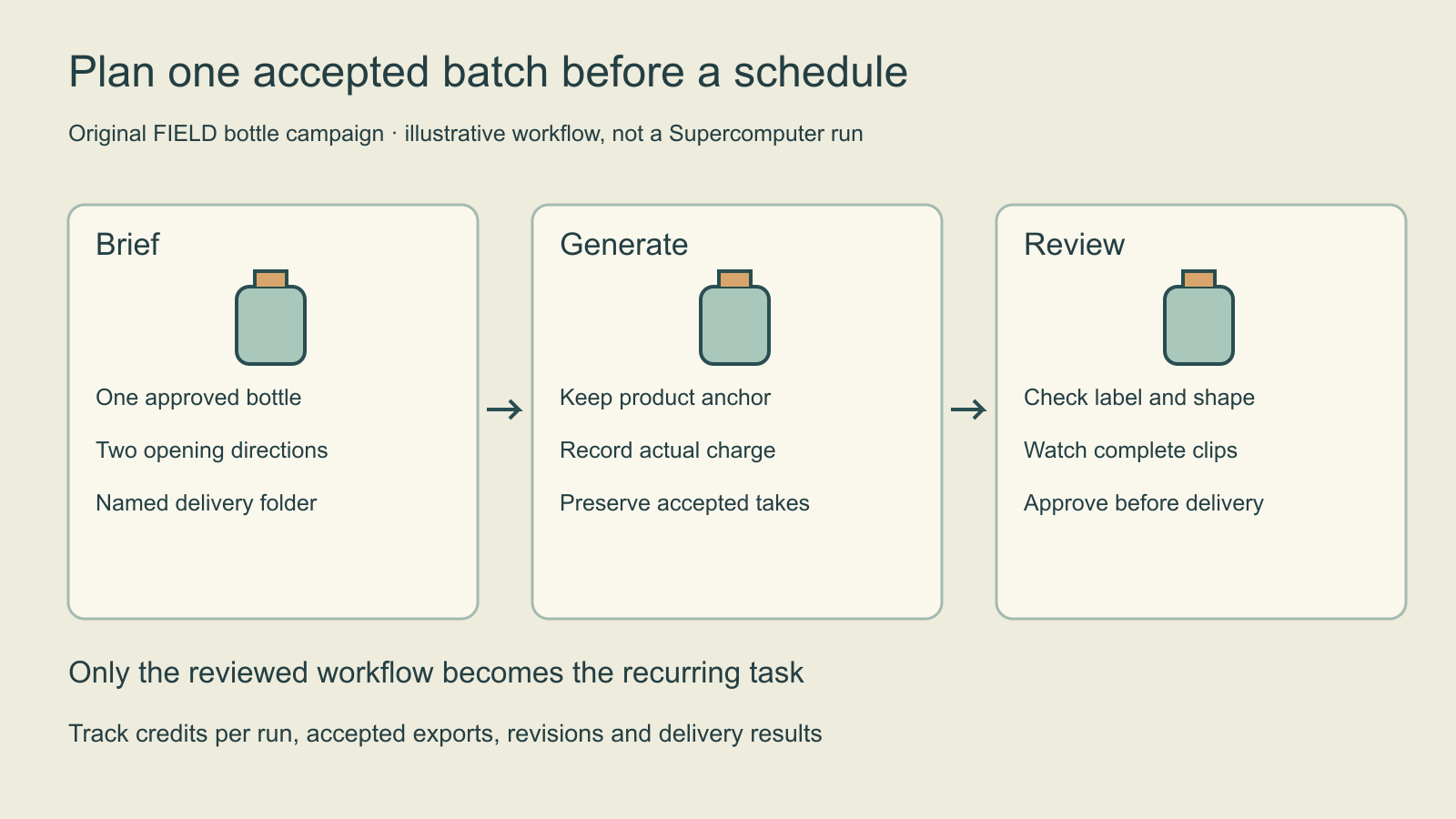
Imagine an original FIELD bottle campaign with two opening directions: a clean studio reveal and a quiet desk setting. Both should use the same approved bottle artwork. Start with a still for each direction, review product identity, then decide which direction deserves motion. This sequence avoids spending a video attempt on a product that has already drifted in the first frame.
| Stage | Acceptance condition | If it fails |
|---|---|---|
| Reference preparation | Approved bottle source and exact label artwork are identified | Resolve the input before generation |
| Still direction | Shape cap and label remain usable | Revise that direction |
| Motion proposal | Action camera and product remain readable | Record the failing beat |
| Delivery | Correct files crop and naming reach the intended folder | Fix export or delivery separately |
The table is an original production plan, not an additional provider specification. Use the inputs and operations actually supported by the selected workflow. If exact label wording is essential, plan a controlled finishing step with approved artwork rather than accepting invented text because the lighting looks good.
Write a brief with a stopping point
Plan two vertical creative directions for the approved FIELD bottle: a studio reveal and a quiet desk scene. Keep the bottle silhouette, cap and label artwork fixed. Begin with one still proposal per direction. After review, animate only the accepted direction. Keep source references and accepted files clearly named. Show the generation cost before running; do not publish or schedule delivery as part of this first exploration.
Download the editable example batch brief. It is an original untested request, not evidence that every instruction is automatically enforced. Inspect the actual plan, quote and returned files. Define the attempt allowance in the real workflow rather than assuming a sentence in the brief creates a hard billing cap.
Keep decisions tied to the specific output. “The bottle changes at the turn” is actionable; “make it better” is not. Preserve an accepted take before requesting another direction. A rejected video should not become the next product reference simply because it is the newest file in the chat.
Understand Supercomputer credits and practical cost
The official help page says generation steps consume credits and the task’s running cost is visible. Check the selected account’s current plan, charge and storage allowance; this guide does not quote a universal price. Multi-step work should be budgeted across generation, revisions and accepted exports.
Use the blank batch review CSV to record each stage, displayed charge, actual charge and acceptance decision. As a hypothetical calculation, if a reviewed batch consumes 120 credits and runs 20 times, its base generation allowance is 2,400 credits before revisions. Those numbers illustrate arithmetic only; they are not Higgsfield rates or a forecast for your project.
Track cost per accepted export as well as cost per run. If the same batch spends 120 credits but only one of three exports is accepted, dividing by three hides the rejected work. Include paid retries in the numerator and count only usable accepted exports in the denominator. Keep subscriptions, storage and any external service costs as separate entries when they apply.
Review a manual run before scheduling
Higgsfield’s official automation guide documents recurring Supercomputer tasks and supported connector delivery. It states that these automated generations consume credits rather than Unlimited access, with scheduled-task availability depending on the plan. A manual first run is the opportunity to validate references, cost and output quality before repetition.
For a recurring workflow, specify the time zone, cadence, destination and behavior when references are missing or an output fails review. Decide whether the result should be a draft for inspection or a published post. A delivery success is not proof that the creative itself passed. Read the files after the first scheduled cycle and inspect the connector result separately.
Do not create a schedule merely to test a prompt. First establish the accepted batch, then repeat its known inputs and review rules. If the target folder changes or the product reference is revised, update that dependency deliberately. Keep a simple record of the last successful run and the version it used.
Choose the workflow that fits the next job
Use the Higgsfield MCP guide when your starting point is an assistant connection. For a reference edit with an existing sequence, read the Katana guide. For a recurring character, prepare an approved character reference pack before asking for a multi-asset campaign.
Clout offers its own Marketing Studio and saved-character workflow. Choose based on the product inputs and deliverable you need. This independent guide does not add Supercomputer to Clout or establish a hands-on speed, quality or cost comparison. The supplied diagram and worksheets help make the production contract inspectable.