

For the newly announced editing workflow, read our Higgsfield Miracle guide with edit prompts and launch-status checks.
Higgsfield Shorts Studio is a preset-led AI short-video workflow whose public tutorial shows how to create through Claude using Higgsfield MCP and /shorts. The starting ingredients are a format, a character, a voice and a script. A useful first project is one original short with an understandable ending, rather than a large batch of loosely related clips.
We inspected the official Shorts Studio page and its four-step tutorial on November 5, 2026. Clout publishes this independent guide as a competing creative platform. We did not connect an account, submit a paid Higgsfield generation or test an export. Below, the briefs, scripts and beat cards are our own planning examples. The photographic cover is separately generated conceptual editorial artwork.
What Higgsfield Shorts Studio does
The public tutorial describes choosing a reference format, supplying a character and voice, and developing a short around a script. Its presets provide creative direction for the edit, including pacing, caption treatment and visual style. The tutorial’s assistant route uses the Higgsfield connector in Claude. These are observed interface descriptions, not evidence that a particular account has every capability.
Think of the format as a container for your idea. A talking character, a narrated sequence of objects and a short product demonstration can all have different requirements even if their final files are vertical videos. Decide what the viewer should understand before deciding which appearance to borrow from a preset.
How to start Shorts Studio in Claude
- Open the official Shorts Studio page and its tutorial.
- Follow its Higgsfield MCP connection route and confirm the intended provider and account.
- Choose a preset for the structure you need.
- Prepare your authorized character reference, selected voice and original script.
- Use the tutorial’s
/shortsentry in Claude, then inspect the proposed operation and current settings. - Review the actual complete output before exporting or publishing.
For connector setup, use our separate Higgsfield MCP guide. A slash command is an entry point, not a standalone installed model or a universal command in every chat application. If the workflow is unavailable, check the connected provider and currently exposed tools rather than repeatedly resubmitting the same request.
The public walkthrough does not establish a price for your specific job. Before execution, inspect the available operation, account entitlement and current charge. A number written in a prompt is not an enforced spending cap. A successful connection also does not establish that an export or social publishing step has completed.
Choose the preset by its storytelling job
The gallery includes creator-led, explanatory and visual formats. Its counters describe what the site displays; we have not independently verified their origin or performance. A high counter is not a forecast for a new video. Start with the format’s narrative mechanics: how it opens, how the subject is introduced and what changes before the ending.
| Your deliverable | Useful format qualities | Prepare before generating |
|---|---|---|
| Creator-led explanation | Readable speaker framing and room for a concrete demonstration | One authorized character, voice choice and a complete spoken script |
| Faceless micro-story | Ordered discoveries with an understandable reveal | Object continuity, narration and the final story event |
| Product demonstration | A feature shown through visible action | Accurate item references and a restrained, supportable message |
Keep the pacing principle while changing the actual story. Do not assume selecting a reference grants rights to someone else’s footage, voice, music or script. Your brief should name the required action and the design details that must remain stable, not merely request a copy of an attractive example.
Original example one the tiny vase
Our first pilot is a fictional potter explaining how shot order changes attention. The subject is a tiny coral vase in a cobalt studio, with a fictional adult creator wearing a yellow apron. The entire point is a move from context to person to detail, then back to the room. It needs no invented customer endorsement or unsupported product claim.
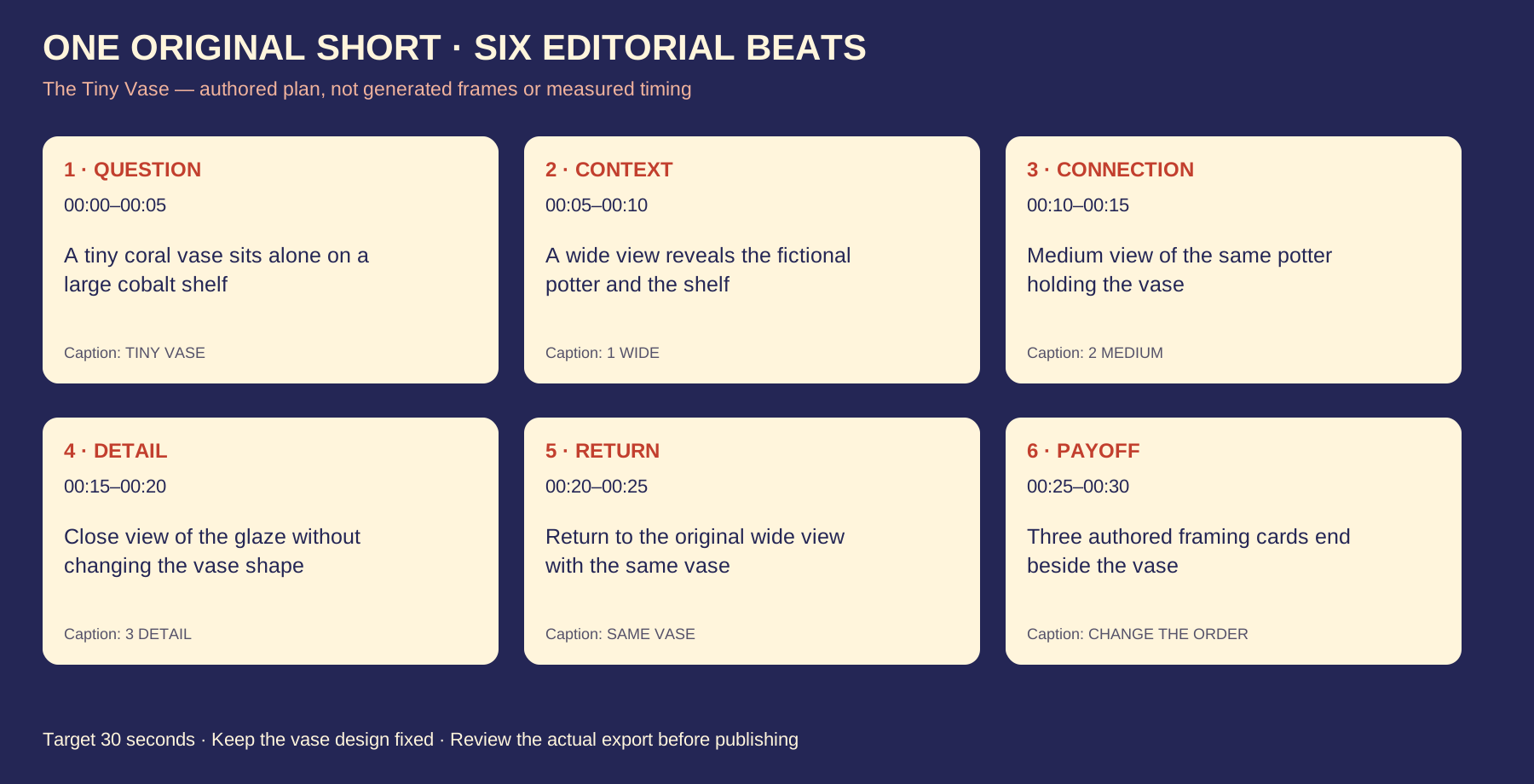
The script is 48 words. Thirty seconds is an editorial target, leaving deliberate pauses for the visual changes. We have not recorded or synthesized the speech, so neither its duration nor the scene timings below are measured. The six ranges organize an edit; they are not six independently verified controls in Shorts Studio.
Why does this tiny vase look so important? First, give it a place in the room. Then bring the maker and object together. Move close enough to see one detail. Now return to the wide view. Nothing grew. The order changed what you noticed. Try wide, medium, detail.
| Target range | Planned visual | Short caption |
|---|---|---|
| 0 to 5 seconds | The tiny vase on a large shelf | TINY VASE |
| 5 to 10 seconds | Wide view of the studio and potter | 1 WIDE |
| 10 to 15 seconds | The maker holding the same vase | 2 MEDIUM |
| 15 to 20 seconds | Close view of the glaze | 3 DETAIL |
| 20 to 25 seconds | Return to the original wide view | SAME VASE |
| 25 to 30 seconds | The three framing ideas beside the object | CHANGE THE ORDER |
Keep one vase design, color and scale throughout. Review its neck, body and glaze between shots. An attractive close-up that changes the object would undermine the point of the demonstration. The cover illustrates the theme; it is not a sequence rendered from these six instructions.
A proposed Shorts Studio prompt
/shortsPlan one original short called The Tiny Vase using my authorized character and chosen voice. Use a suitable preset for pacing, caption rhythm and broad visual direction. Keep the script and vase design original. Target thirty seconds with the six editorial beats in my brief. Show the proposed scene plan, supported settings and current charge before submitting a generation. Do not invent a model, price or publishing capability.
This is a proposed planning request, not an executed tool call. Replace the character and voice references with ones you are entitled to use, then approve the exact text. If a current workflow cannot accept the supplied beat format, adapt the request to its supported controls while preserving the script and visible ending.
Save the accepted brief alongside the eventual output ID. That makes a later failure specific: a missing final line, a changed vase, an unreadable caption or a transition that arrives before the explanation. A vague request for better quality provides less direction than naming the missed event.
Two more original use cases
The Spare Key is a fictional faceless mystery. A brass key appears beside an empty frame. A paper door suggests the wrong solution; the key instead opens a drawer behind the frame, revealing an older photograph of the room. The short ends with a discovery rather than stopping before the promised answer. Keep the key, frame and shelf consistent across all six proposed views.
The Bag With One Red Pocket is a fictional product-led demonstration. A cream canvas bag is difficult to search, then a red pocket gives a key and card a clear location. The proposed script describes the visible organization. It does not claim a real customer tested the bag, that it saves a measured number of seconds or that the imaginary product is available to buy.
The original brief pack contains complete narration drafts, continuity rules and caption ideas for all three. They are different production problems, not the same script with new nouns. Use the first to test creator continuity, the second to test story logic and the third to test object accuracy.
Review character voice captions and ending separately
Watch the entire result at normal speed before zooming into individual defects. Does the first question receive an answer? Does the final spoken line finish? Then inspect the recurring character and object, compare speech with the approved script and read every caption. The first good-looking frame cannot answer these questions.
Check transitions around hands and objects, especially where a creator picks something up or places it down. Compare the same details before and after the cut. For narration, listen for omitted words and changes in meaning. For captions, prioritize exact wording, sensible line breaks and placement that stays clear of the important action.
Record a specific acceptance decision for each attempt. Our blank output review CSV has empty outcome fields for actual duration, charges, refunds and defects. No successful run is prefilled. Compare total real cost with accepted outputs, including rejected attempts, rather than dividing a plan allowance by a theoretical number of videos.
Shorts Studio Content Factory and Clout
These names describe separate workflows. This page covers Shorts Studio’s preset and Claude tutorial. Our Content Factory guide covers that separate topic-and-reference interface. Neither guide proves that both products share settings, entitlements or publishing behavior.
For a different provider, evaluate Clout Faceless Studio against the same original brief. Use Clout AI Influencer when a recurring character is central, or AI Cinema for a more deliberately staged sequence. Choose the workflow by the actual asset you need and inspect its current options and quote. We have not run a matched platform quality benchmark here.
Keep generation, export and publication as separate outcomes. A completed generation is not proof that a social account received the correct file. Before repeating a series, inspect one finished master, its final crop and sound, then confirm the intended destination and any actual publishing controls.
Download the original planning files
- Three complete original pilot briefs
- The Tiny Vase six-beat script and caption CSV
- Editable vector beat-card layout
- Blank actual-output review sheet
- Dated source and limitation record
- Complete original planning and artwork pack
The files are ordinary text, spreadsheet and graphic assets. They do not install a connector, add a skill, generate a video or schedule a post. For timing your own draft before submission, use the separate AI YouTube Shorts generator guide and its speech-planning workflow.


