An SVG filename does not tell you whether an icon is made from editable shapes. The file might contain paths, live text, a linked image or a mixture. If the job is a recolorable logo or a scalable icon set, inspect the actual export before accepting it.
The free local inspector above reads your SVG and reports its declared dimensions, viewBox, geometry, text and image references. It does not generate images, upload your file or display untrusted artwork. Use it as a structural check alongside a visual review in your design editor.
Choose text to vector rather than a vector-looking PNG
Some image generators can produce the appearance of flat vector art while still delivering a raster file. That can be suitable for a thumbnail or concept board, but it does not provide editable curves. Ask for the delivery format before choosing the tool.
| Need | Useful output | What to inspect |
|---|---|---|
| A scalable icon with editable colors | SVG containing meaningful shapes | Selection, fill colors and small-size readability |
| A photographic campaign image | High-quality raster export | Actual pixel dimensions and detail |
| A layered design with typography | An editable design document or a suitable SVG | Text objects, fonts and grouping |
| A raster illustration converted to vector | A traced SVG | Contour quality, node count and simplified detail |
Generation and tracing are different operations. Tracing starts from pixels and estimates shapes. A vector model creates an intended vector output through its own generation workflow. Both still need review, especially for tiny details, lettering and shapes that overlap.
Which AI models export SVG
Recraft documents Vector variants within its V4.1 family, and its V4 documentation lists separate vector choices. Check the selected version and export operation. Our Recraft guide explains the family and supplies original briefs.
Use your required deliverable to evaluate any other tool. Does it offer a native SVG download? Can you edit individual parts? Does it retain external image dependencies? A preview labeled “vector style” does not answer those questions.
Inspect the file before you call it fully vector
MDN documents that an SVG image element can include raster images or other SVG files. That is why an SVG container alone does not prove every visible part scales as geometry. A file can mix a raster photograph with vector labels and decorative shapes.
The inspector counts geometry elements such as paths, circles and rectangles, as well as text and image elements. It also reports recognized raster-image references and external href references. Counts include definitions; they do not prove that every counted shape is visible, well organized or easy to edit.
For dimensions, read width and height alongside the viewBox. The viewBox defines an internal coordinate rectangle. A small coordinate system does not itself mean the file is low-resolution, and large width and height values do not transform an embedded photograph into vector geometry.
Try three original editable SVG icons
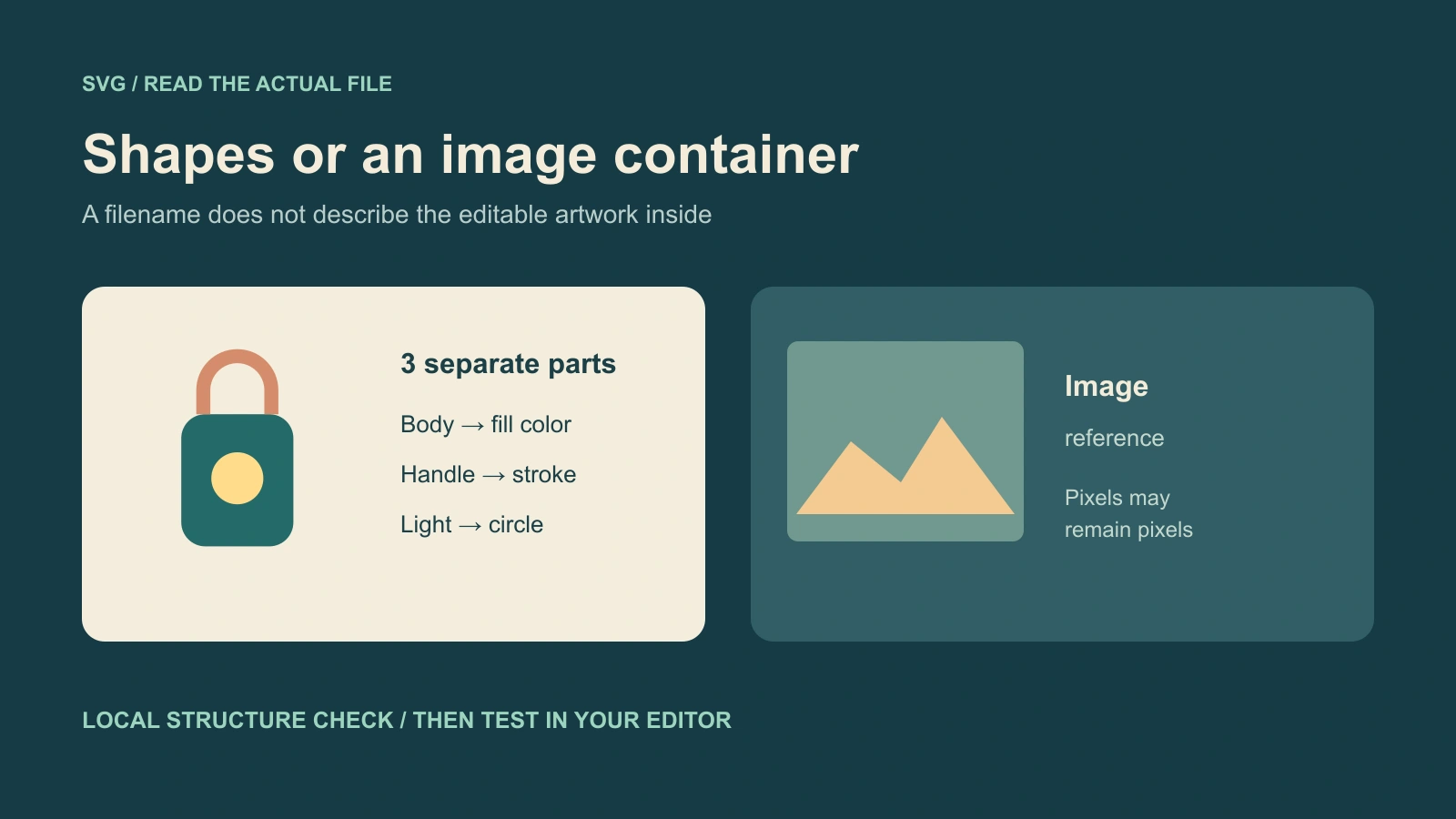
Download the solid lantern, outline lantern and dark-background version. These files were authored directly with geometric SVG elements. They are practice assets rather than outputs from an AI SVG generator.
- Load one file into the inspector and note the declared canvas and geometry count.
- Open it in a vector editor and select the lantern body separately from its handle and light.
- Recolor the body, then compare all three variants together.
- Preview the icon at its actual small display size.
- Export the final format your destination accepts and reopen that file.
The solid version is useful for testing filled regions; the outline version tests stroke readability. The dark version checks contrast against a darker background. Keep these visual questions separate from whether the XML is well formed.
Write a prompt that matches the export job
Create a simple vector lantern icon with a rounded teal body, terracotta handle and amber circular light. Use three solid colors, closed shapes and generous spacing. No gradients, textures, shadows, text or embedded photographs. Keep the silhouette readable at small sizes and deliver editable vector geometry through the selected SVG operation.
This is an original untested prompt. The final phrase does not override a raster-only tool; you still need to choose an operation that supports SVG output. When the result arrives, compare the actual silhouette, openings and overlapping shapes with the brief.
For a matching set, hold the palette, stroke treatment and visual density constant while changing the subject. Review all icons on the same background. A set can have valid SVG files and still look inconsistent.
Fix the export problem you actually found
| Finding | What it means for delivery | Next step |
|---|---|---|
| Only an embedded raster image | The container does not supply editable object shapes | Use a vector operation or review a traced conversion |
| Many tiny contours | The artwork may be difficult to revise or read at small size | Simplify detail and review a cleaner version |
| Live text | Typography may depend on fonts in the destination | Check font availability and the intended final delivery |
| External image references | The file may depend on separate assets | Check packaging and the destination's supported handling |
| Missing or unsuitable framing | The export may crop or scale unexpectedly | Inspect the viewBox and canvas in a design editor |
The inspector is not a security validator or a guarantee of visual editability. It deliberately reports text instead of mounting the uploaded SVG on the page. Review the finished asset in the tools and destination you actually plan to use.
Use the finished graphic in the wider campaign
Keep a source SVG and a compatible raster export when the campaign needs both. Use the vector source for layout and recoloring, and choose an appropriate image export for channels that do not accept SVG. An uploaded screenshot should not become the only surviving copy of an editable brand asset.
Build the rest of your campaign in Clout Marketing Studio with its own creator and image workflows. This local inspector does not add AI vector generation to Clout. For campaign image direction, read the Recraft model guide; for pixel-based finishing, use the AI picture workflow guide.