

Choose the styling job before choosing an AI stylist
An AI stylist can help suggest outfits from your wardrobe, create an image of a different outfit or plan a visual direction for a creator campaign. Those outputs solve different problems. A useful outfit suggestion should reference clothes you own or can actually obtain. A generated fashion image can explore a direction, but it does not prove that a garment exists in your size or fits your body.
Start with the decision you need to make. If you are choosing what to wear tomorrow, collect the real items and the occasion. If you are planning a campaign, approve the character, garment direction and scene references. If you want to see a visual variation, label it as a concept until you check the product and physical fit separately.
| Your goal | Useful input | Output to review |
|---|---|---|
| Wear your existing clothes differently | A catalog of actual wardrobe items | An outfit made from available pieces |
| Explore a new garment direction | A permitted portrait and clear garment brief | A generated visual concept |
| Plan a creator campaign | An accepted character and campaign constraints | A consistent styling set across scenes |
| Pack for a trip | Weather, activities and actual clothing | Outfits and an item checklist |
Write a personal styling brief from actual constraints
Tell the workflow the occasion, likely conditions, dress expectations and pieces you want to use. Add practical preferences: comfortable shoes, a layer you can remove, a color you enjoy or a garment you prefer to avoid. State whether you are looking for combinations from your existing wardrobe or are open to buying something, with an explicit budget for that purchase.
A brief such as “make me fashionable” leaves the system to invent the problem. A more useful instruction is: “Plan a casual studio presentation outfit from my ivory shirt, olive trousers, navy overshirt and white trainers. Keep the trainers because I will be standing. Suggest one optional layer and explain the role of each item.” You can accept or reject that answer using the actual clothes in front of you.
Use a wardrobe tool when you want combinations from your closet
Whering’s official styling instructions distinguish Dress Me, a wardrobe shuffle, from W Pick, which provides personalized outfit suggestions. The documentation explains seasonal, color and Lookbook filters and saving outfits into Lookbooks. That is a wardrobe-selection workflow: the value depends on the items you have added, rather than on a generated image that happens to look stylish.
Stylebook’s official feature list describes outfit collages using your own clothes, Outfit Shuffle, a searchable clothing catalog and packing lists. Its image-import features also include AI background removal. A background-removal feature is a way to prepare garment images; it is not evidence that the application measures physical fit from a generated portrait.
These are documented workflow examples, not a hands-on ranking of the apps. Give a candidate the same small set of clothes and the same occasion before comparing it. Inspect whether the proposed items exist in your wardrobe, whether you can edit the suggestion and whether the saved outfit remains available where you need it.
Plan one base outfit for three occasions
Consider an original fictional creator whose base wardrobe contains an ivory shirt, olive trousers, navy overshirt and plain white trainers. For a daytime errand, the brief can prioritize movement and an easy removable layer. For a studio presentation, it can prioritize an uncluttered neckline and a clear silhouette on camera. For a casual dinner, it can explore a different layer or accessory while retaining pieces the person owns.
The exercise does not require inventing a new wardrobe every time. Record the base items, what changes between occasions and why the change helps. A generated concept may visualize the layer direction, but the final outfit still needs an actual clothing check. For campaign visuals, also compare the face, hairstyle and garment details against the approved references.
Compare a base outfit with one visual variation
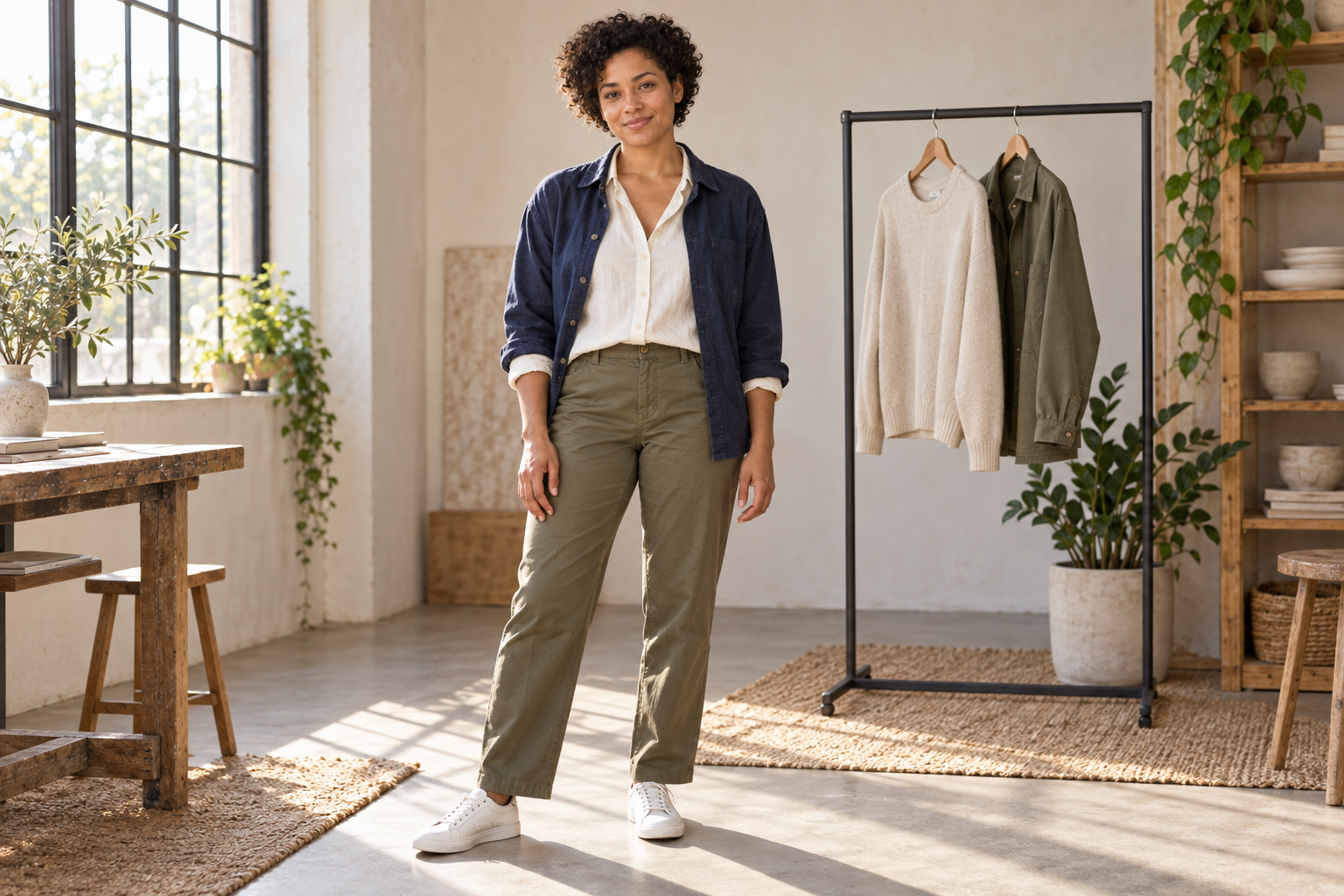
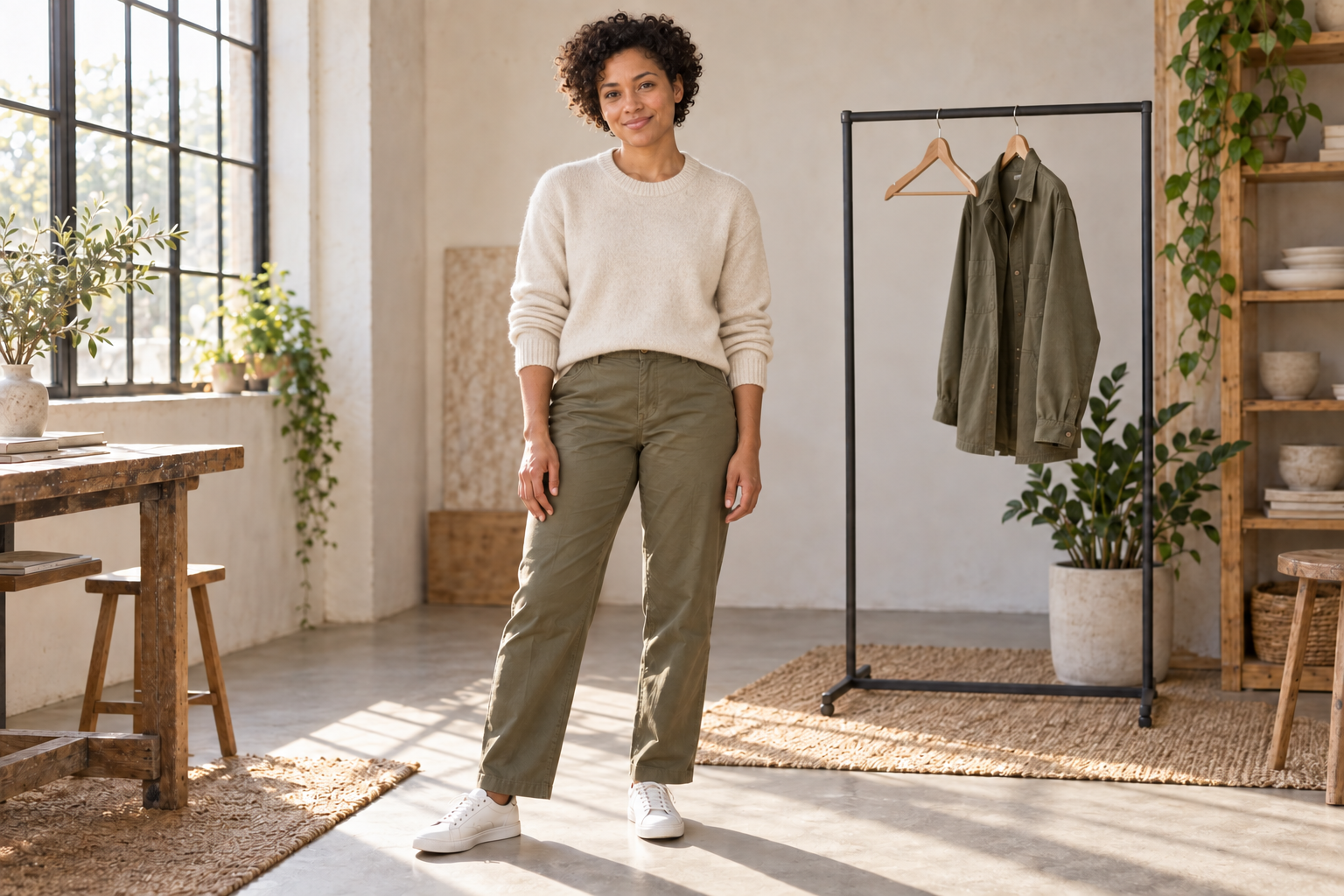
Our example uses an original fictional adult in an independently generated styling studio. The base outfit combines an ivory shirt, olive trousers, navy overshirt and white trainers. The second image is an actual reference-led edit requesting the ivory knit from the rail instead of the shirt and overshirt.
Download the base outfit concept · Download the knit variation · Download the outfit planning worksheet
The knit direction changes the neckline and removes the dark outer layer. The character’s curls, pose, trousers, shoes and broad room composition remain visually similar. The editor also removes the hanging sweater, leaving an empty hanger. Neck details, cuffs, hem and drape are interpreted. These observations come from the actual files; they do not establish pixel-identical preservation or the fit of a purchasable sweater.
Both images were produced independently with a built-in image generation editor. They are styling concepts rather than Clout or wardrobe-app screenshots. Use them to see what a one-variable brief changes, then inspect your own exports and actual garments.
| Occasion | Direction from the base items | Check before accepting |
|---|---|---|
| Daytime errand | Shirt and trousers with trainers and a removable overshirt | Movement, forecast and comfortable shoes |
| Studio presentation | Keep the simple base and decide whether the dark layer helps the camera silhouette | Neckline, visible clothing details and the actual camera crop |
| Casual dinner | Explore the ivory knit instead of the shirt and overshirt | Venue expectations, warmth and the real garment fit |
Separate visual try-on from verified garment fit
Use generated outfit imagery to explore color, layering and scene direction. Check the original garment photos when a specific product matters: seams, visible markings, fabric pattern and silhouette should not be silently replaced by a similar-looking item. Keep a concept distinct from a product representation if the editor invents those details.
Physical fit requires separate evidence such as the actual garment, measurements and the retailer’s information. A convincing generated image can show a sleeve or hem in a plausible position without proving how that item feels or moves when worn. Review your actual clothes before using an image as the reason to buy or pack them.
Keep a creator styling set consistent across scenes
Approve the original character before making wardrobe variations. Keep its accepted reference with the garment direction and scene brief. Change one styling variable at a time so you can see whether a new layer affects identity, body proportions or the visible product. Reject variations that solve the wardrobe direction by changing the character.
Clout can create an original AI character and generate photos and videos around that identity and visual direction. Use the accepted outfit concept as part of your campaign scene brief, then inspect the exported set. For a garment change on an existing portrait, use the separate clothes-changing workflow; for a complete fashion campaign, use the lookbook guide.
Use a concrete menswear brief
For an AI stylist for men, begin with the same practical inputs rather than asking for a universal “best male outfit.” For example, a person who owns a navy overshirt, plain white T-shirt, dark straight-leg jeans and comfortable trainers could request a casual dinner combination using only those items. Add the venue, weather and whether an extra layer is available. Ask the suggestion to explain which item does each job.
A second brief might adapt those clothes for a work presentation with a known dress expectation. If a collared shirt is needed and the person does not own one, the useful answer should identify the missing piece rather than pretend the white T-shirt becomes a different garment. Record the proposed purchase separately and check the budget, sizing and retailer information before buying.
For creator content, the styling request should also describe the accepted character and visual direction. A generated image can explore a menswear silhouette, but review the real garment reference when a specific product matters. The woman’s concept images above illustrate the editing method; they are not presented as a tested menswear app result.
Compare AI stylist apps with one small wardrobe
Start with a manageable set of owned clothes and one occasion. Compare whether the app accepts your actual items, lets you restrict suggestions to them, explains combinations, edits a saved outfit and preserves it in a planner or export. A catalog tool, an outfit recommendation tool and an image editor can all be useful, but their outputs should be evaluated against the job you selected.
Do not score an app for features you did not verify. Record the current device support, account requirements and any allowance before importing a complete wardrobe. If an app proposes items outside your closet, label them as shopping ideas so they do not get mixed into tomorrow’s outfit plan.
Check what a free styling allowance actually includes
A free download, a trial and a usable exported outfit plan can have different conditions. Check the current account offer, wardrobe-item limits, saving or export controls and any charge for additional operations. This article does not claim that a specific app provides an unlimited free AI stylist. The blank worksheet is available to download so you can record the comparison yourself.
Record an outfit decision in the worksheet
The CSV contains six review areas with blank fields for the intended change, export observation, decision and revision notes. Use the first rows for the occasion, actual wardrobe items and comfort check. Record the selected combination next. For a generated image, also compare identity and garment details, then inspect the downloaded crop and dimensions.
Keep rejected concepts as well as the accepted one. If a variation looks appealing but invents a garment, note that reason instead of quietly turning it into the final product reference. For personal styling, finish the decision with the real clothes. For a campaign, save the approved character, garment direction and scene brief together.
Create a styled character campaign in Clout
Create an original AI character in Clout and generate photos and videos around an accepted outfit direction. Start with one character reference and a concise wardrobe brief, then review the exported set for face, hair, clothing and scene continuity. Keep the styling decision tied to the use case, whether it is a casual creator post, a studio presentation or a fashion campaign.
Create my styled character in Clout


