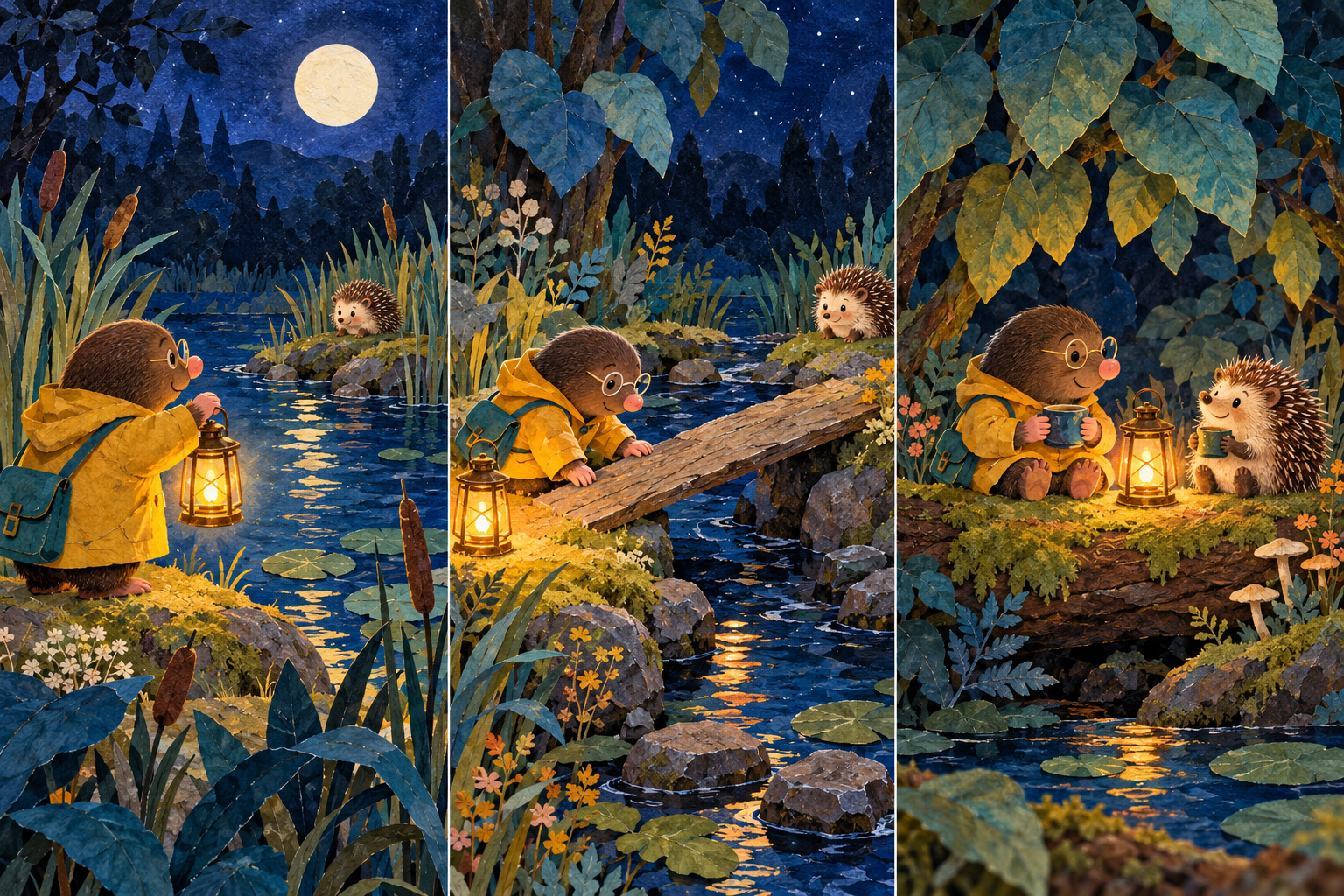
An AI storybook generator can turn an idea into illustrated pages, but a useful book needs more than a collection of attractive pictures. Something must change from one page to the next. The words need room to breathe, and the character needs enough recognizable details to remain part of the same story.
Start with a small complete example. Our original A Light to Share has three prose pages: a mole notices a hedgehog across the water, finds a crossing, then shares the lantern’s warmth. You can read the separate text, inspect all three illustrations and download the self-contained HTML book and source project.
Choose a complete storybook or an illustration workflow
| Your task | Workflow to inspect | What must remain editable |
|---|---|---|
| A whole illustrated story from a prompt | A storybook generator with a reading format | How revisions affect text and illustrations |
| A planned book with exact prose | Separate writing, illustration and layout stages | Text, page order and image placement |
| A character-led illustration sequence | Reference-led image generation | Accepted character references and scene briefs |
| A narrated version | Supported narration plus a reviewed reading experience | Pronunciation, pacing and language support |
If you primarily need character references and individually generated scenes, use our separate AI book illustration workflow. This page focuses on assembling and reviewing the book. An illustration file alone has no page order, prose or narration.
Write the page beats before requesting images
Give each page a job. A beginning introduces a need, a middle shows a response, and an ending changes the situation. You can expand that structure, but adding pages should add meaning rather than repeat the same scene.
| Page | Original beat | Visual requirement |
|---|---|---|
| Across the water | Milo sees someone beyond his little circle of light | Mole, lantern, water and distant hedgehog |
| A way across | He makes the crossing visible | A board across the narrow stream with light nearby |
| Enough for two | The light becomes something shared | Both characters together in the lantern’s warmth |
The editable page plan contains the complete original prose, each beat and the intended visual check. Keep this record outside the generated image. If a sentence changes, you can edit the words without asking the image model to draw the letters again.
Use a storybook prompt that specifies the reading task
Create a short illustrated story about a small mole who notices a hedgehog across a pond and finds a way to share lantern light. First propose the beginning, middle and ending with one meaningful change per page. Use warm, clear prose and a quiet ending. Keep the character anchors consistent: brown fur, round glasses, pink nose, mustard raincoat and teal satchel. Keep exact prose editable separately from the illustrations. Show how the finished book can be revised and shared before making a larger version.
This is a proposed brief for a supported story workflow, not a provider schema or an executed Gemini request. Adapt the reading level, length and language to the reader. Ask for a page plan first when you need to review the structure before spending time on polished art.
Inspect our original illustrated story
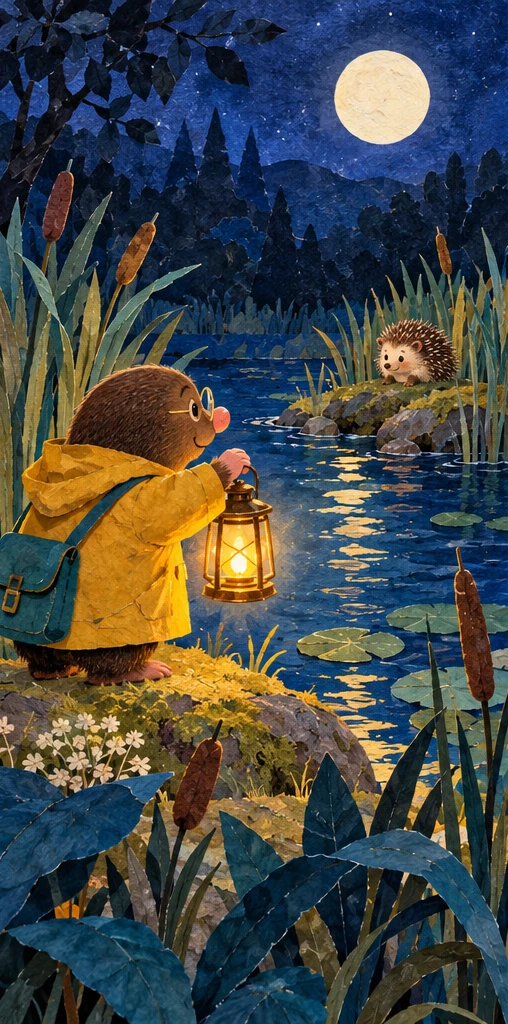
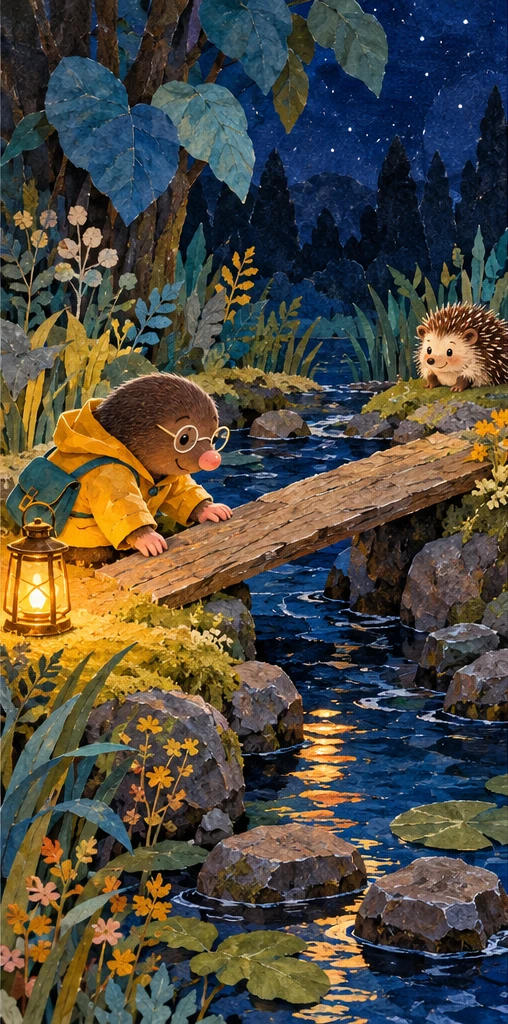
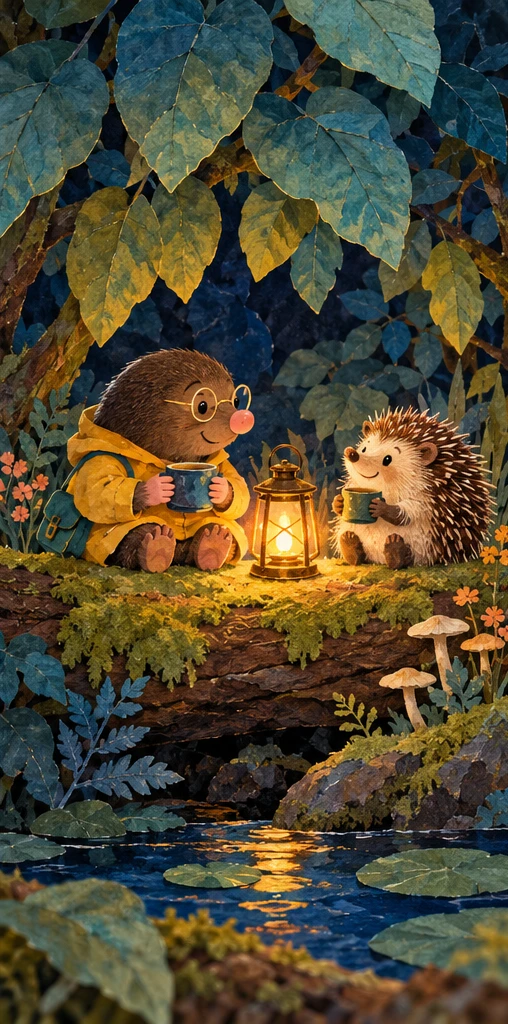
The original illustration request produced one three-panel sheet. We cropped it into three images, inset two pixels at each panel edge to remove divider lines. The crop record preserves those coordinates. This is not three independently generated pages and does not prove that a model can retain the character over repeated separate requests.
The broad mole cues repeat: mustard coat, glasses, pink nose and teal bag. Posture and fine details change. The middle image shows the mole leaning over a board; it does not demonstrate the motion of placing it or whether the bridge would work physically. The final illustration adds mugs that were not requested. Those added props fit the quiet scene, but should still be an explicit editorial decision.
Read the complete three-page example
Open A Light to Share or download the self-contained HTML book. It contains the three supplied images and selectable prose, with links to each page. It has no external requests, tracking, narration or AI generation. The layout includes small-screen and print styles; actual browser layout, print preview and physical printing remain untested.
Soon two friends sat beneath the leaves. The hedgehog leaned toward the warmth. Milo had not found a bigger lantern. He had found a place to put the one he had. Its little golden circle was enough for two.
The ending returns to the opening’s circle of light with a changed meaning. That connection is part of the authored prose. The image generator supplied the illustrations, not an evaluation of whether the story makes sense.
What Gemini Storybook documents
Google’s Storybook page describes a ten-page illustrated story with read-aloud narration and optional files or photos. It says revisions happen through the conversation rather than direct on-page text editing, and a regenerated version receives new images. That matters when you only want to change one sentence.
The same FAQ distinguishes public sharing for personal accounts from Workspace and Student accounts, and notes that narration language support can differ from story availability. Check your actual account and output. We did not create or export a Gemini book, and our three-page HTML example is a separate authored resource.
What FlipHTML5 exposes in its storybook workflow
The public FlipHTML5 AI storybook generator presents topic or specific-content inputs, a page-size selection, a one-to-ten-page choice, language and up to three custom colors. Those are useful planning controls to inspect if you need a designed publication.
Public controls do not establish the quality of a generated book or your account’s export allowance. We did not run the app. Check whether your exact text survives, how images fit the selected pages, and which delivery format is actually returned before choosing it for the final project.
Download and edit the source project
The source archive includes the original illustration sheet, prose JSON, render script, provenance and filled review. With Bun and Sharp installed, run bun storybook-render-source.ts . . from the extracted folder. It rebuilds the three cropped WebPs, crop record and HTML reader. Edit the prose JSON to change words or headings; it does not create new illustrations.
You can also download the native illustration sheet, crop coordinates, filled review CSV and provenance record separately. Reproduction checks confirm the supplied files recreate the same layout outputs. They do not reproduce the image-generation process.
Review the book as a reader before expanding it
Read the prose aloud and look at each illustration in order. Check whether a page repeats an earlier beat, introduces an unexplained prop or changes the character’s purpose. Confirm that the ending answers something the beginning established. Then inspect typography, crop and image resolution in the intended delivery format.
Our sample has no recorded narration, sound or animation. If your next step is a spoken story, plan that separately with the educational video workflow or Clout Faceless Studio. For new reference-led artwork, explore Clout Image and Video. This guide does not claim Clout has an automatic narrated storybook export.