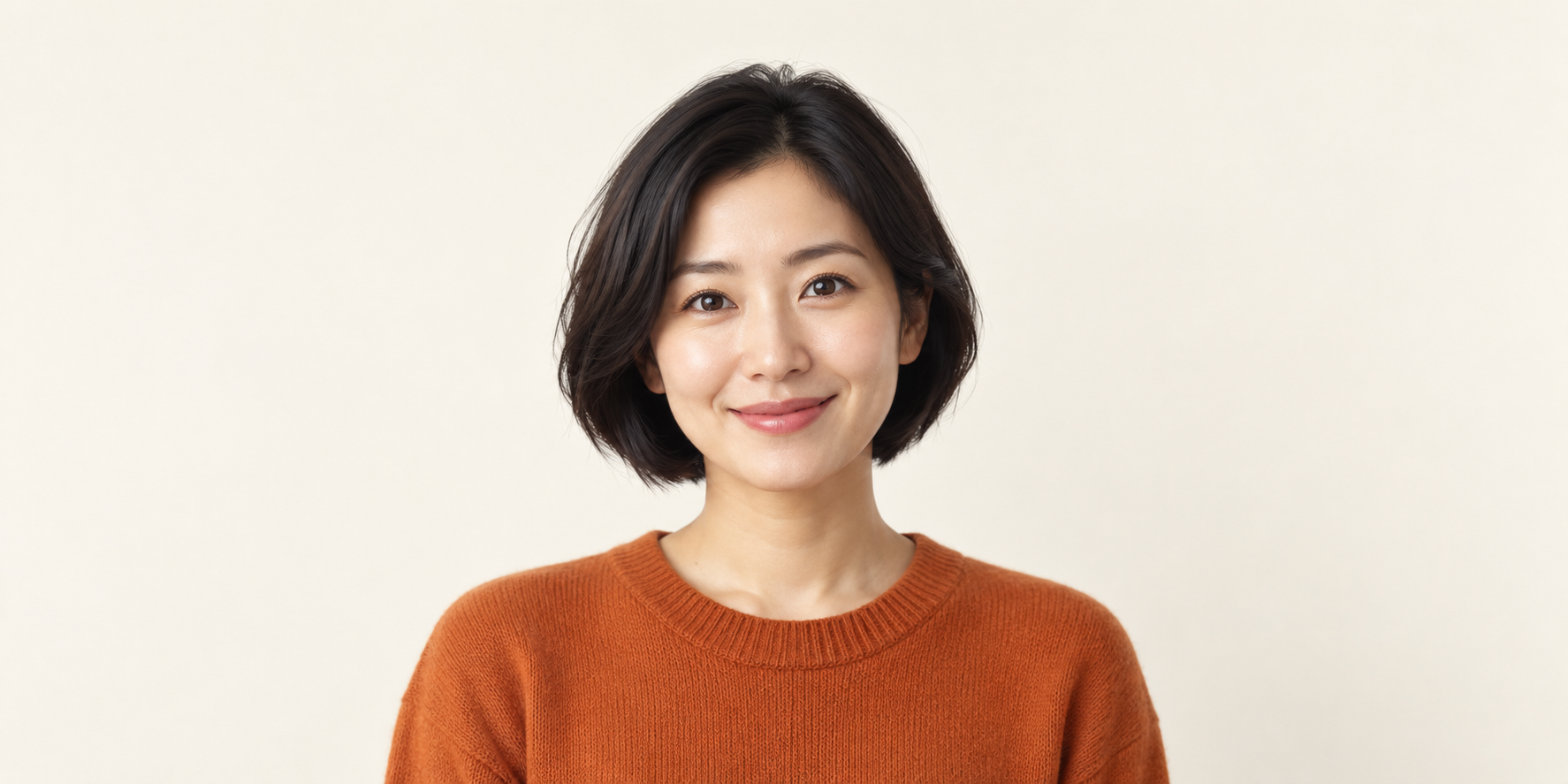
An AI profile picture generator is useful when it gives you a portrait that people can recognize in a comment, message or channel page. A dramatic full-size image can still fail as a tiny account icon if the face is small, the crop cuts the hair or the background competes for attention.
This guide covers profile-picture production for social and creator accounts. It includes original fictional portrait artwork, three prompts you can adapt and previews at small display sizes. For a professional headshot workflow, use the separate AI LinkedIn photo guide; for a full recurring content identity, use the consistent creator workflow.
Decide whose identity the picture represents
Choose between a portrait of yourself, an original fictional creator and a stylized avatar. Each has a different acceptance test. A portrait of you should remain recognizably you. A fictional creator should have a stable approved look. A stylized avatar should communicate the intended character clearly at small size.
| Profile type | Useful input | Main review question |
|---|---|---|
| Your real identity | A clear permitted photo of you | Does the result preserve the features people recognize |
| Original AI creator | An approved fictional character brief or reference | Will this face match the creator in future content |
| Stylized avatar | A character and visual-style brief | Does the silhouette and expression read as a small icon |
For a real-person portrait, use a reference-led editing workflow where supported and inspect the result rather than assuming the model preserved your likeness. For a fictional account, save the accepted reference before changing outfits or scenes. The avatar versus influencer guide explains when one profile asset becomes a recurring content system.
Frame the portrait for the crop it will actually use
A square working image gives you a straightforward starting canvas for an account icon. Keep the eyes, mouth, hairline and facial outline away from the edges. Use enough space above the hair that a circular presentation does not cut off the crown.
Head and shoulders usually provide a useful balance for a portrait account. A full-body composition can make the face too small, while an extreme close-up can lose important identity features in the crop. Preview both the square and circle before choosing the final framing.
- Center the identity you want the viewer to notice.
- Keep a margin around the hair, ears and chin.
- Use a background that separates from the face and wardrobe.
- Remove unnecessary props and tiny lettering from the brief.
- Review the crop at the size people will actually see.
Circle-safe framing is a production choice, not a universal platform measurement. The exact crop controls can differ by surface. Inspect the account's upload preview rather than assuming your working file will appear unchanged everywhere.
Compare the original portrait at three icon sizes
Our example is a fictional creator with a short black bob, an orange knit top and an ivory background. It was generated as original artwork. It is not a transformation of a real person's photo or evidence of a provider's likeness accuracy.
The three previews below use the same original image with a centered circular display at 32, 64 and 128 pixels. They help you inspect whether the face, expression and color separation remain readable. They are browser previews, not exported profile files or exact replicas of a platform's interface.
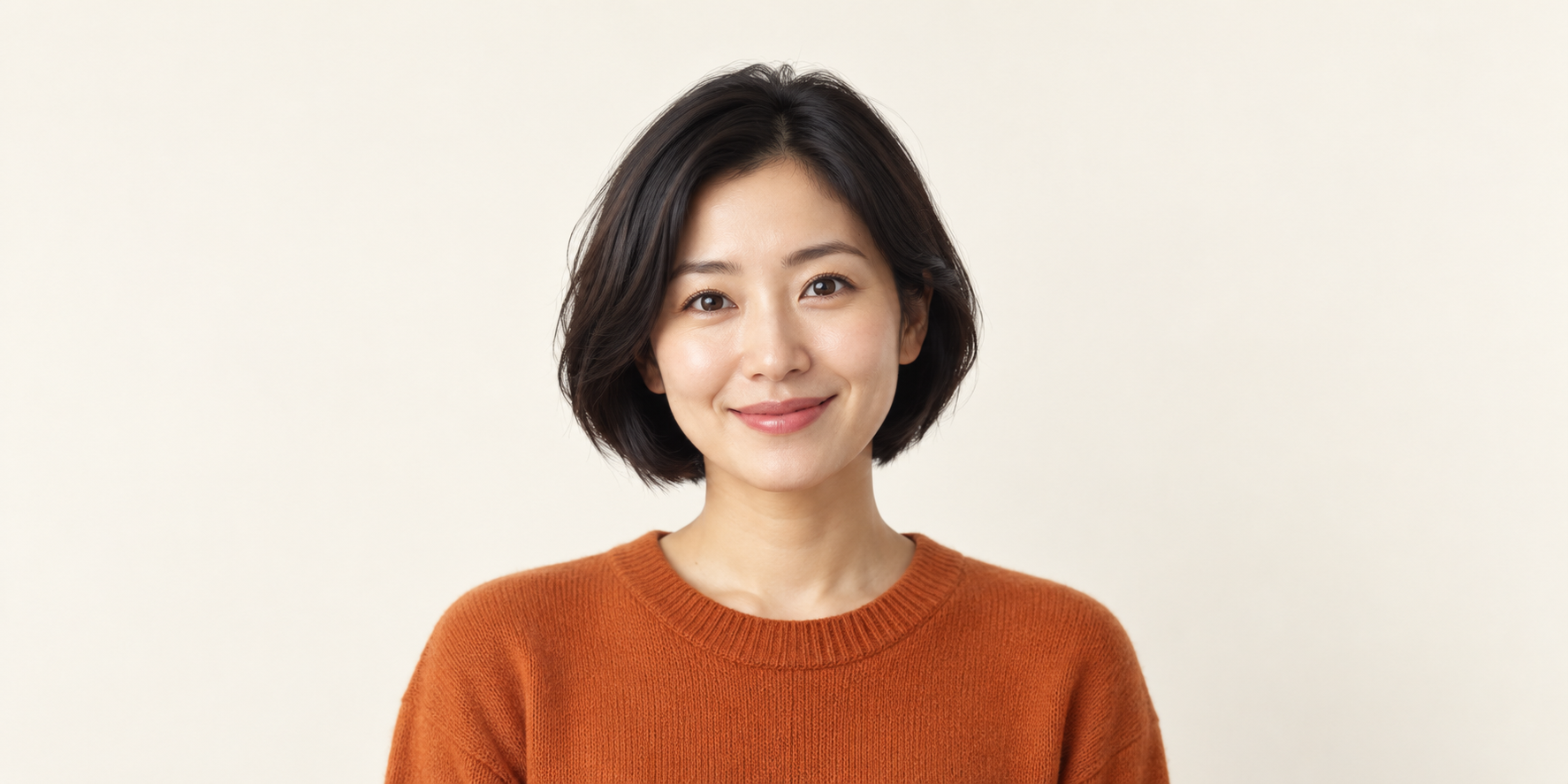
Download the original full-resolution portrait artwork. The wide source preserves the full artwork; make an approved square delivery copy in your editor or the destination's crop controls. Keep the original for future revisions instead of repeatedly saving over it.
Use these sizes as editorial review examples. If the smallest preview looks anonymous, simplify the background or choose a closer portrait. If the circle trims the hair, revise the framing. Adding more texture is unlikely to solve a crop problem.
If an existing portrait is too soft, use the AI photo deblurring guide to compare sharpening and restoration before changing the crop.
Use three prompts with a clear purpose
Download the original profile-picture prompt pack. Adapt one brief at a time. The prompts are starting instructions, not a promise of identical faces across independent generations.
Clean creator portrait
Head-and-shoulders portrait of an original fictional adult creator with a neat short black bob, a natural warm smile and a burnt orange crewneck. Simple ivory background, soft daylight, crisp eyes and natural skin detail. Center the face and keep generous space around the complete head for a circular profile crop. No text, logos or props.
This is the clearest starting point when recognizability matters more than an elaborate scene. Once accepted, use the image as the identity reference for supported follow-up work.
Reference-led personal profile revision
Use the permitted portrait reference to preserve this adult person's recognizable facial features, hairstyle and natural expression. Change the background to a simple neutral studio and use soft balanced light. Keep the full head inside a centered square composition with room for a circle crop. Avoid exaggerated facial changes, lettering and props.
Use this only in an operation that supports image references or editing. Check the eyes, facial outline and distinctive features yourself. A prompt cannot guarantee likeness fidelity.
Illustrated community avatar
Original illustrated adult character with a clear head-and-shoulders silhouette, short dark bob, orange top and friendly expression. Simple cream background, restrained shapes and strong visual separation. Center the complete head for a circular profile crop. No lettering, logos, tiny accessories or crowded background.
Choose a style that still reads when reduced. Keep that style consistent if the avatar represents an ongoing community identity. This illustrated prompt has not been rendered for the article; the downloadable example is the photographic fictional portrait.
Check current platform requirements before export
Requirements checked October 2, 2026 differ by platform. The following table summarizes the relevant official help pages rather than assigning one universal upload size.
| Platform | Documented file guidance | Practical check |
|---|---|---|
| X | JPEG, GIF or PNG with a 2 MB maximum and recommended 400 by 400 dimensions | Export a compatible copy and inspect the applied profile crop |
| YouTube | JPG, GIF, BMP or PNG, no animated GIFs, at most 15 MB and displayed at 98 by 98 pixels | Review the channel icon at a small display size and inspect Studio's crop |
X's upload troubleshooting page documents its format, file-size and recommended dimensions. YouTube's channel branding guide documents its formats, current size cap and small display size. Confirm the current page before exporting a campaign set.
The WebP shown in this article is a web-display asset, not a claim that every platform accepts WebP uploads. The original PNG download gives you a source for a compatible delivery copy. Check both file size and crop after export; enlarging a small source does not restore missing facial detail.
Fix the problem at the right production step
| Problem | Inspect first | Useful revision |
|---|---|---|
| The icon looks generic | Face size and recognizable features | Choose a closer crop around the approved identity |
| The hair is cut off | Top margin in the square and circle | Use a roomier source or move the crop |
| The face changed | Reference selection and edit scope | Return to the approved reference and change less at once |
| The background dominates | Contrast and detail behind the face | Simplify the scene rather than adding more effects |
| The file is rejected | Format, dimensions and file size | Export a supported copy within the current limits |
Download the blank profile-picture review sheet. Record the identity, crop, small-size readability, export properties and upload result. No scores or claimed conversion improvements are prefilled.
Compare candidate portraits under the same crop and display size. That comparison is more useful than selecting one at full size and another as a thumbnail. Keep the best version and its source prompt together so the next revision starts from approved work.
Keep the profile and the content recognizably connected
If the PFP represents an AI creator, use the approved identity beyond the account icon. Clout lets you build an original creator and coordinated photos and video scenes around that character. A recognizable profile is the entry point to the content series.
Plan the first few posts around the same face, wardrobe baseline and visual tone. Add a new setting or outfit deliberately, then compare the result with the approved reference. Do not treat a new portrait in every post as consistency merely because the colors match.
Continue with the AI creator launch guide for the next publishing decisions and the Instagram creator strategy for connecting the profile to a coherent feed.