

The action-figure effect works when the person becomes a believable miniature object. Painted vinyl, a stable base and restrained articulation tell that story more clearly than a normal portrait with a shiny filter. The most common failure is asking for a full-body figure from a tightly cropped selfie without explaining the missing wardrobe and pose.
This guide covers the image workflow: an original downloadable courier figure, three prompts and a review process for turning an approved reference into toy-style artwork. It does not promise a physical toy or reusable geometry from a single generated picture.
Download an original full-body figure example
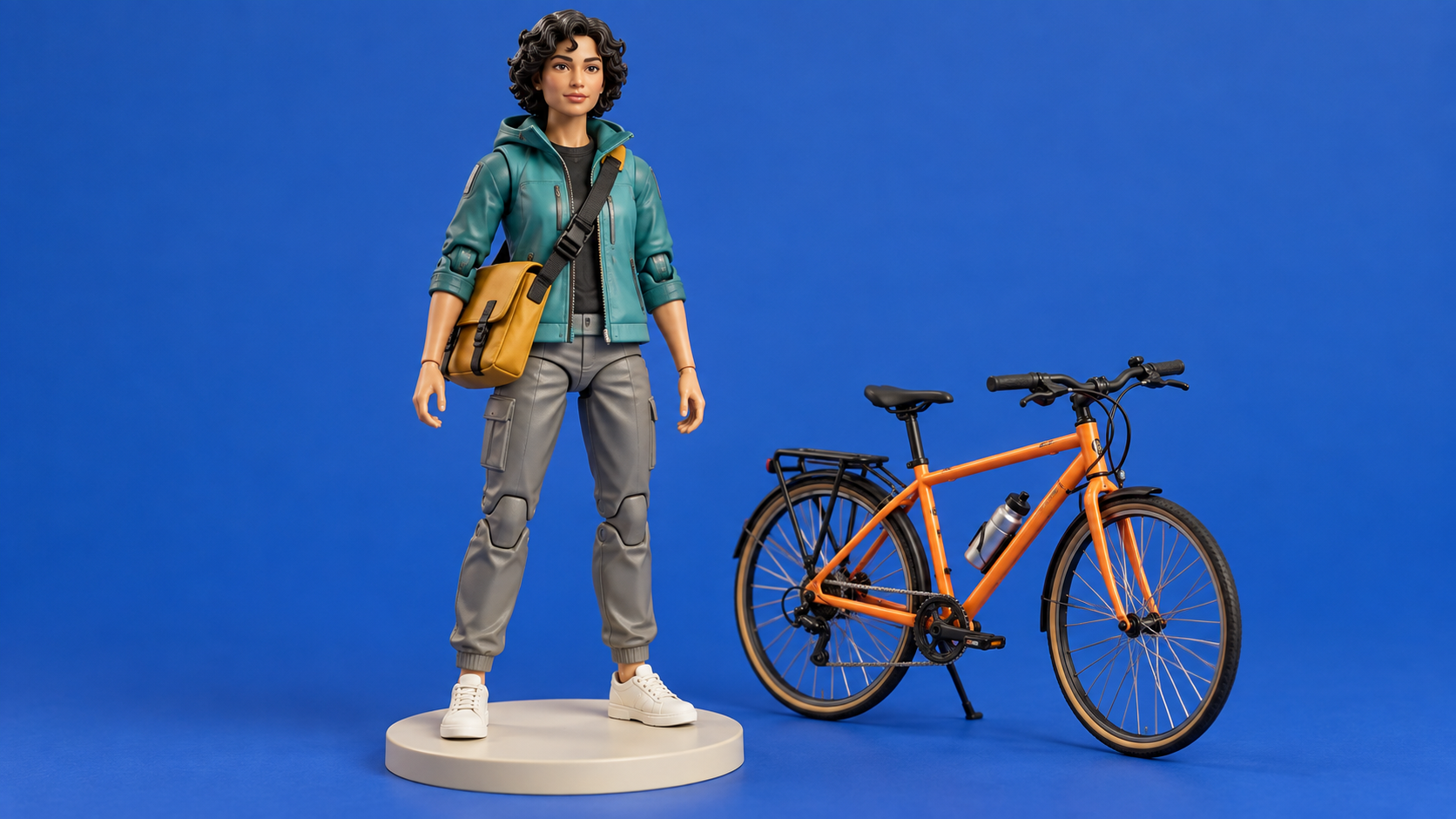
Original AI-generated toy-style artwork of a fictional adult courier. The image is a visual reference, not a CAD model or a physical manufactured toy.
Download courier action figure referenceThe reference uses a short list of identity anchors: short curls, teal jacket, mustard messenger bag and white shoes. The bicycle supports the character's role. Adding a dozen unrelated accessories would make the silhouette harder to read and give the generator more objects to distort.
Choose the output you actually need
| Output | What you receive | What it does not establish |
|---|---|---|
| Toy-style image | A picture that looks like a collectible figure | Editable geometry or working joints |
| Figure reveal video | A moving visual presentation of the toy concept | A true turntable of an accurate manufactured object |
| Editable 3D asset | Geometry and materials in a supported 3D format | Printability without inspection and repair |
| Physical toy | A manufactured or printed object | Something image generation alone delivers |
Higgsfield's 3D Figure page describes a photo-to-toy-style effect and offers video generation. Its displayed effect is relevant visual inspiration, but the page does not by itself establish that you receive editable mesh geometry. Check the actual export format of any tool before planning a printing workflow.
Prepare a photo that supports the figure
Use a clear, well-lit image of a person whose likeness you have permission to use. A full-body reference is helpful for outfit, stance and proportions. If you only have a headshot, explicitly describe the trousers, shoes, body pose and accessories as newly designed elements. Do not imply that generated clothing is what the real person wore outside the original frame.
Reduce ambiguity before generating. Choose one outfit, one pose, one base and one material finish. Save the original reference separately. A neutral standing pose makes it easier to inspect anatomy than an extreme jump with foreshortened arms and hidden feet. For a recurring fictional creator, retain the same face reference across variants.
Use an AI figurine generator for a repeatable creator concept
An AI figurine generator can mean an image effect or a tool that builds geometry. For creator posts, the useful output is often a toy-style image: the same recognizable character presented as a collectible, a desk miniature or a campaign mascot. Decide that output before choosing the workflow. If your goal is an object you can rotate in a 3D editor or manufacture, move to the 3D reconstruction guide and inspect the actual file format.
For the original courier above, make the character brief concrete. Keep the short curls, teal jacket, gray trousers, white shoes and mustard bag. Separate those identity anchors from the treatment: a painted vinyl surface, a cream circular base and a miniature bicycle. This separation lets you change the setting while retaining a recognizable campaign character.
- Approve the reference Use one clear adult creator photo or the original fictional courier artwork. Record which face, hair and wardrobe details matter. A tight headshot needs a separately described lower-body outfit.
- Choose one figure treatment Specify a desk miniature or collector figure. Avoid combining oversized chibi proportions, realistic anatomy and articulated action-figure joints in one contradictory brief.
- Direct the composition Ask for the complete figure and base with space above the hair and below the shoes. Keep the bag distinct from the torso and the bicycle separate from the hand.
- Review at full size Compare the face, palette and accessory placement against the reference. Reject a changed bag color, fused wheel, missing shoe or extra hand even if the small preview looks polished.
- Save the accepted version Store the reference, prompt and result together. Use that approved image for a reveal or a new scene rather than changing the identity and material in every attempt.
For a desk variation, retain the courier's identity anchors and replace the studio sweep with a warm wooden desk and one pencil cup. Keep the figure on its cream base and put the bicycle beside it. The pencil cup is a visual scale cue; it does not establish a real measurement or a manufacturable scale.
Download the figurine creator brief and review checklist. Fill in your own identity anchors and record the faults you observe. The example is an original creative brief, not a claim that a specific provider reproduced every detail.
Separate a custom figurine image from a printed keepsake
Searches for a custom 3D figurine from a photo can also mean a physical gift. A good concept image helps explain the desired outfit and pose, but it does not supply hidden geometry, dimensions or a finished object. Ask a manufacturing service what references it needs, what design approval you receive and whether its final deliverable is a model file or a shipped figurine. Clout's creator image workflow supplies visual concepts; it does not turn a WebP download into a printed toy.
The distinction is visible in current tools: Meshy's figurine page lists model exports such as GLB, OBJ and STL, while the Higgsfield effect linked above presents a photo-to-figure video treatment. Verify the chosen export and inspect geometry before planning a physical print. A video of a turning miniature is not interchangeable with a mesh you can inspect from arbitrary angles.
Three prompts for distinct figure treatments
Full-body collector figure: Using the approved adult reference, create a complete collectible action figure standing upright on a small round cream base. Preserve the face shape, hair and outfit colors. Painted matte vinyl, subtle elbow and knee articulation, one messenger-bag accessory, soft studio light and clean cobalt backdrop. Both hands and shoes fully visible, no printed labels, no logos and no additional characters.
Desk miniature: Create a toy-style miniature of the referenced adult creator beside a pencil cup on a warm desk. Keep the face and hair recognizable, simplify the outfit into painted vinyl surfaces, show the full figure with a balanced stance and soft grounded shadow. Use the pencil cup only as a scale cue. No altered facial identity, no packaging text and no extra limbs.
Campaign character: Render the same fictional courier as a premium full-body collectible with teal jacket, gray trousers, white shoes and mustard satchel. Place one small orange bicycle beside the base, preserving the figure's proportions and toy material. Warm cream studio sweep, crisp painted details, calm front three-quarter view and complete head-to-toe framing.
Keep the material words specific. Matte vinyl gives a different surface from glazed ceramic or resin. If the figure keeps looking human, ask for simplified sculpted clothing folds, painted eyes and visible toy joints. If it becomes too caricatured, specify the facial proportions that should remain closer to the reference.
Fix a cropped head or missing feet
First change the composition, not the identity. Ask for head-to-toe framing with space above the head and below the shoes, a smaller figure inside the canvas and a neutral pose. A portrait crop is often better for one standing figure; a landscape crop works when the accessory and setting have a real role. Keep the subject large enough to inspect without forcing it to fill every edge.
If the bag changes sides, write its shoulder and hip placement explicitly. If the accessory merges with a hand, separate it on the base. For a targeted repair, preserve the accepted face and wardrobe rather than rerolling the entire character. Save each accepted iteration with its prompt and reference so the next image starts from evidence rather than memory.
Review identity and toy construction separately
Inspect the face, hair and outfit first. Then count fingers, check that the feet meet the base and look at each apparent joint. A seam painted onto a surface does not mean the toy has functioning articulation. Compare accessories across variants, especially wheels, straps and duplicated handles. Zoom in on the original file before approving an image that will appear large on a blog or campaign page.
For social use, add any needed text in a layout editor after the figure is approved. That gives you control over spelling and safe margins. Avoid copying retail packaging or implying a licensed collaboration. A fictional creator with an original accessory set can become a recognizable campaign character without borrowing another brand's identity.
Turn the figure into a short reveal
Use the accepted image as a first frame and request one gentle camera move. A slow push-in is easier to evaluate than a full rotation that invents the unseen back. Review the face, joints and accessory through the whole clip. Label the finished visual according to what it is: a generated toy concept, rather than evidence that a real toy exists.
Build an original character in Clout and create coordinated character photos and videos. Keep your approved identity reference while exploring a collectible visual treatment.


