Topview AI is an AI video platform whose current site describes an agent workflow for short films and marketing videos. Start with the official Topview website for access. This independent guide shows how to turn a product reference into a reviewable brief and inspect a finished cut.
What Topview AI does
Topview describes inputs including an idea, script, reference video or product URL. Its agent plans scenes, selects models and generates assets that can be edited on Canvas. The site also links Drama Studio, Board and a 3D Shot Composer. These are provider descriptions, not results of an account test in this guide.
Choose the workflow by the deliverable. A product concept, an episodic drama and a short-film sequence need different evidence and continuity checks. A product URL can supply a starting point, but it cannot make every extracted statement an approved advertising claim.
Separate product facts from visual direction
Our fictional Arc Dripper reference has an orange exterior, an ivory ribbed interior, a loop handle and a broad base. Those are visible design cues. The picture cannot establish material composition, brewing performance, capacity, heat resistance or dishwasher safety.
Before submitting your real brief, collect approved product facts, usable media and the destination format. Keep proposed scene direction separate from verified claims. Ask for a clarification when a missing fact affects the ad rather than letting an agent invent the benefit.
Create a six-second vertical product concept from the approved orange dripper reference. Use a full product shot, a closer detail crop and a return shot with a concept invitation. Preserve the orange and ivory design cues. Do not invent product performance, a price or a purchase offer. Present the shot plan and actual outputs for review before delivery.
This is an original planning prompt, not a Topview API request or a completed provider run.
Inspect the original three-shot concept
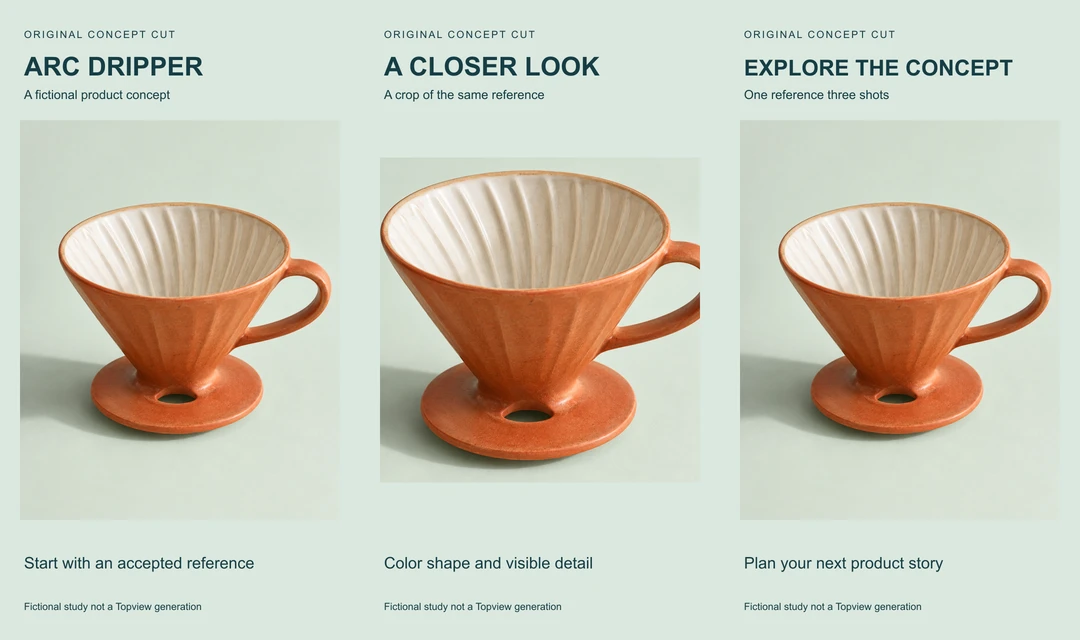
Download the six-second MP4 and original reference PNG. The cut contains three static two-second shots at 720 by 1280 pixels and 24 frames per second. It has 144 frames and no audio. Hard cuts change the composition; the object itself is not animated.
The first and final shots use the same source framing with different text. The detail crop clips part of the right handle, so it should not be used to approve the complete silhouette. This deliberate inspection point is recorded in the filled review CSV. The example does not demonstrate Topview generation quality or a functioning physical product.
Review the agent proposal before scaling
| Stage | Review | Keep |
|---|---|---|
| Input | Correct product and approved facts | Source and rights record |
| Plan | Shot purpose duration and needed references | Approved storyboard |
| Generation | Actual files preserve the intended subject | Job and selected take |
| Edit | Continuity text timing crop and sound | Versioned timeline |
| Delivery | Complete exported file meets destination requirements | Final export and review |
One attractive frame cannot prove continuity through a video. Watch the entire export and inspect transitions, moving hands, product contact and legible text. If a model introduces an unsupported feature, return to the approved brief and source instead of adopting the invention as a product fact.
Check access and cost for the selected route
Read the current official plan and generation controls in your own Topview account. A model name or promotional unlimited card on a public site does not prove that every operation, resolution or period is included. Record the selected route and estimate before submitting a batch. We did not purchase access, run a paid generation or compare provider queues.
Keep local editing separate from new generation. Changing copy on an accepted still may only require a timeline revision. Changing a camera angle can require a new take and another continuity review. Inspect an existing accepted job before submitting a replacement after an observation timeout.
For a distinct delivery task, use the Pippit campaign format study to compare native wide square and vertical crops before placing copy or scheduling a post.
Reproduce the original edit
Download the editable source archive and shot ledger. The archive includes the generated fictional reference, TypeScript layout script and filled review. Install the pinned Sharp dependency with bun install and run bun topview-concept-source.ts . with FFmpeg available. The supplied environment used Sharp 0.34.5 and FFmpeg 9.0.1. Font and encoder differences can change output bytes.
For a different production task, continue with AI UGC planning or explore Clout Marketing Studio. Clout and Topview are separate products and accounts. This example does not claim a shared integration or a Topview feature inside Clout.