
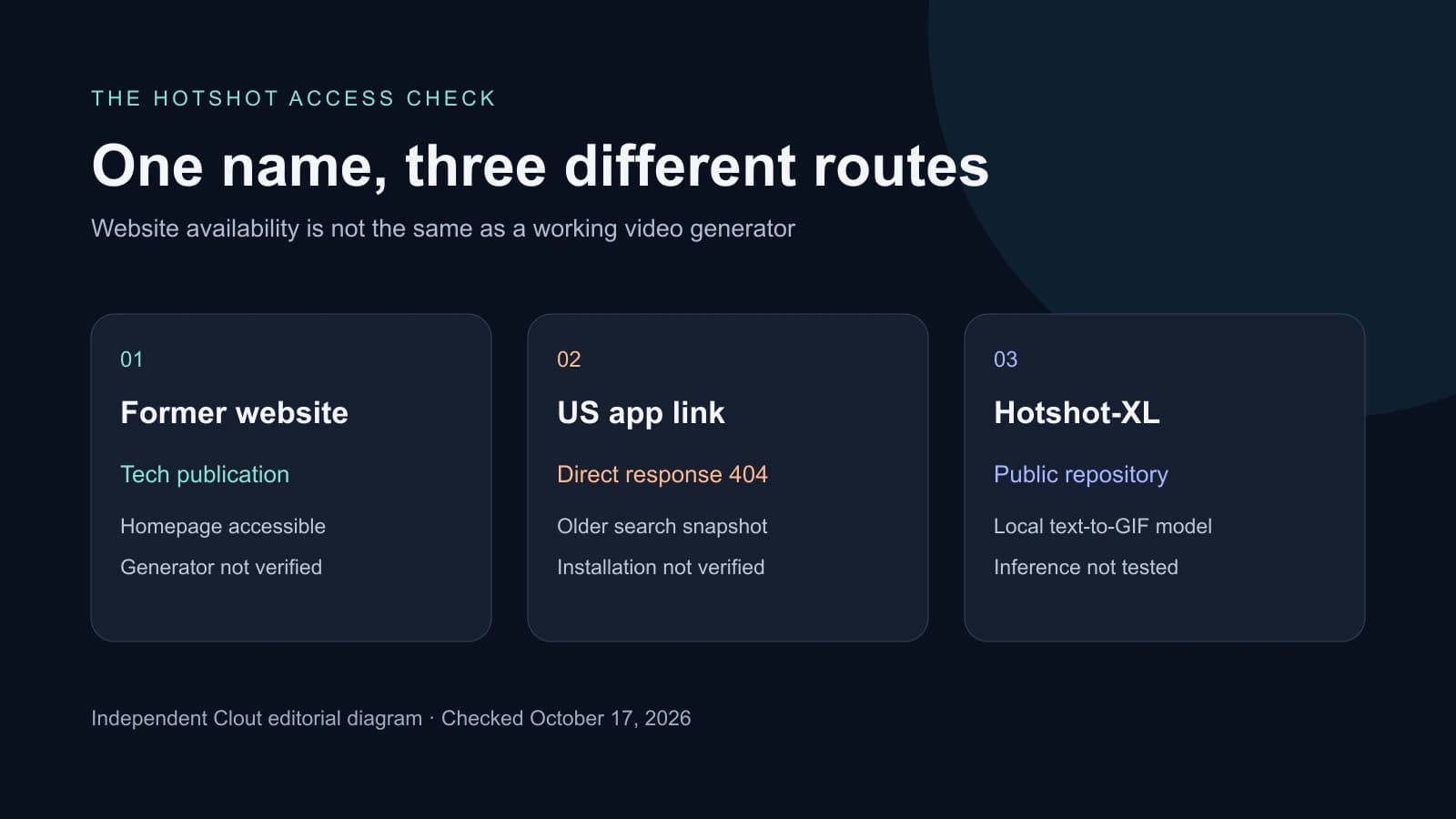
If you searched for a Hotshot AI free video generator and found guides telling you to sign up at hotshot.co, check the destination before following the tutorial. Our direct checks found a different situation from those older instructions. There are three separate things to distinguish: the website, the former iPhone app listing and the public Hotshot-XL model.
This is an access guide, not a recommendation to buy a replacement subscription. Start with the status checks below, then choose a workflow that can actually deliver your clip.
What works at the old Hotshot links now
| Destination | Our October 17 check | What that establishes |
|---|---|---|
| hotshot.co | HTTP 200 with a technology publication homepage | The accessible homepage did not present the old video generator |
| US App Store listing | Direct URL returned HTTP 404; Apple lookup returned no result | We could not verify installation through this US link |
| Original Hotshot-XL GitHub repository | Public repository accessible | Code and model documentation remain available, not a hosted rendering allowance |
The current homepage contains technology articles and category navigation. The original model repository still links to that domain, which explains why old guides lead there. A working domain by itself does not show that the earlier generator is available. We did not establish who currently owns the domain or infer that from its content.
The former US App Store URL is useful as an identifier, but it returned 404 in our direct request. Search still surfaced an older listing snapshot labeled Free with in-app purchases. That snapshot is historical evidence, not a current installation or generation test. We did not test an already-installed copy, other storefronts, account access or the app backend.
If the result changes for you, record the exact URL, region and date. A page opening is the first check; signing in, generating a test and downloading a usable file are separate checks. Do not treat a stale search snippet as a current free-credit offer.
Hotshot-XL is a different route from the old hosted app
The original Hotshot-XL repository describes a text-to-GIF model designed to work with SDXL. Its documented training target is one-second animation at eight frames per second. It also documents SDXL LoRA and ControlNet integration. The README labels changes to duration and frame count experimental.
That makes it a possible technical research project for someone exploring short animated images. It is not equivalent to opening a current web service and downloading a finished narrated video. The repository links setup instructions and model weights; we have not executed that environment or verified compatibility with a current GPU stack.
Before trying local inference, inspect the dependency versions, relevant code and model licenses, required storage and hardware support. Keep the experiment in a separate environment and record what you changed. The absence of a hosted subscription charge does not remove hardware or compute costs. We have not validated a one-click installation path or a minimum GPU specification for this article.
Decide whether you need a GIF experiment or a finished video
A looping illustration for a prototype can be a different job from a five-second product shot, a talking creator or a narrated reel. Write down the intended output before choosing a replacement. For a product shot, specify the object that must remain recognizable, the movement, framing and export shape. For a talking character, add speech and lip-sync requirements.
Try this original brief for a small first test:
A plain cobalt ceramic cup rests on an ivory table beside a window. The camera moves slowly closer while a thin ribbon of steam rises. Keep the cup shape, handle and daylight direction consistent. End with the cup fully visible and the camera still.
This is a proposed prompt, not a tested Hotshot result. Start without dialogue, a moving hand or several camera changes so there are fewer failures to diagnose. If the handle changes shape, the shot fails that brief even if the lighting looks attractive.
Current video workflows to evaluate instead
| Starting point | Route to inspect | Check before spending |
|---|---|---|
| Text or a source image | A current video generation interface such as Higgsfield | Available model, supported inputs and displayed charge |
| Programmatic video generation | Current Grok video API documentation | Authentication, supported operation and usage billing |
| Recurring AI character | Clout character and motion workflows | Saved identity, reference clip and workspace credit quote |
| Local animated-image research | Original Hotshot-XL repository | Dependencies, weights, licenses and compute requirements |
For a hosted workspace, inspect the Higgsfield video interface and our Higgsfield workflow guide. Available models and plan allowances need checking in the account you will use. This article does not verify a free Higgsfield generation allowance.
For a developer integration, begin with the current Grok video documentation. Our Grok Imagine guide separates API and consumer workflows. Do not assume an old Hotshot login, balance or subscription transfers to another service.
For a recurring creator in Clout, explore AI Influencer or Image and Video. Clout is a separate service with its own account and workspace credits. These are different workflow options, not a claim that we run Hotshot-XL or reproduce the former app.
Verify a free offer before building the whole project
Check whether the allowance covers the exact operation you need, whether the result downloads, whether it has a watermark and what usage terms apply. An app labeled free to download can still charge for generation or restrict export. A preview is not proof that the final delivery is usable.
Download the access and export checklist. It has blank fields for the service, date, region, access result, model, quote, export and decision. Fill it from your own checks; no successful render or free allowance has been prefilled.
Once access is confirmed, use the same small brief across the tools that support it. Count rejected attempts as part of the cost, inspect the whole clip and compare usable exports. Keep the accepted source and final file so you can distinguish an input issue from an export issue later.


